What is a good ACoS on OTTO, and how do I calculate it?

By Keanu Dutado · Last updated: 5 November 2026
In short
There's no good ACoS for everyone on OTTO, and OTTO doesn't publish one either. ACoS is your ad spend as a share of ad revenue, the revenue after a click on your ad, and it's good as long as it's below your own target ACoS. To get that target, take the gross price, the price including VAT, subtract all costs of a sale except advertising, express the rest as a percentage of the gross price and subtract the margin you want to keep. Measure against the ACoS of the individual item, because OTTO's dashboard also counts purchases of other items from your brand and therefore shows a lower ACoS.
If you look for a good ACoS, you'll find almost nothing but numbers for Amazon. They don't help on OTTO, because your ACoS depends on your margin and OTTO counts ad revenue in its own way. In practice, many sellers have no target of their own. They see a good-looking number in OTTO's dashboard and keep running ads that earn little or nothing on the individual item.
Why there's no good ACoS for everyone on OTTO
In the partner portal, OTTO calls ACoS „KUR (ACoS)“, short for Kosten-Umsatz-Relation (cost-to-revenue ratio). The math is the same as on Amazon, ad spend divided by ad revenue. 30 € of ad spend for 100 € of ad revenue is a 30% ACoS. ROAS is the same calculation the other way round, ad revenue divided by ad spend, and OTTO writes it as a percentage. 100 € of ad revenue for 25 € of ad spend is a ROAS of 400% and an ACoS of 25%.
OTTO doesn't publish average ACoS values, neither for all sellers nor per category. The guide to Sponsored Product Ads contains only worked examples. The success stories on advertising.otto.de name individual campaigns from 2024 and don't say how they were counted.
A fixed number wouldn't help you anyway. If an item leaves you 35% of the price before advertising, you still make money at a 30% ACoS. If another leaves you only 20%, you lose money on every sale through the ad at the same 30%. Only your own target tells you whether an ACoS is good.
How OTTO calculates the break-even point
OTTO gives a formula in its guide to Sponsored Product Ads, the break-even ROAS. It's your gross price divided by your contribution margin before advertising, times 100. Contribution margin here means what's left of the gross price after all costs of a sale except advertising. In the guide's example, 10 € remain from a 50 € gross price, so the break-even ROAS is 500%.
Written as ACoS, you turn the calculation around. Break-even ACoS is your contribution margin before advertising divided by the gross price, in the example 10 € of 50 €, so 20%. At this ACoS you neither earn nor lose anything on a sale through the ad. Above it you lose money.
These come off the gross price.
- VAT,
- the OTTO commission, depending on the commission group 7% to 22% of the price including VAT, with the payment fee already included,
- your purchase price,
- your shipping,
- further costs per sale, such as packaging.
Fixed costs like rent or staff don't belong here. In its guide, OTTO takes VAT off the gross price and divides the rest by the gross price, because OTTO's ad revenue is gross too.
According to the guide, a higher ROAS doesn't mean more profit. A campaign at 900% ROAS can bring you more money than one at 1,000% if it sells more. Break-even only tells you where the limit is.
From break-even ACoS to your target ACoS
At break-even ACoS you earn nothing. So your target ACoS sits below it, by your target margin, the share of the gross price that should at least be left for you after all costs of a sale.
Express all three numbers as a percentage of the gross price, the way OTTO calculates ACoS. A margin as a percentage of the net price is 1.19 times larger at 19% VAT, and you'd be comparing it with an ACoS based on the gross price.
Target ACoS=Break-even ACoS−Target margin
How much margin is enough is your decision. There's no number that fits everyone here either. Items with similar margins get the same target, items with a clearly different margin get their own.
A targeting is what you place a bid on at OTTO, so an item in an automatic campaign or a keyword in a manual campaign, meaning a word your ad should appear for. In practice, experienced sellers steer each targeting by its target. If its ACoS is below, there's room to grow and they raise the bid. If it's above, they lower it. After a change, many sellers wait 7 to 14 days before judging again. 7 days are enough for campaigns with many clicks, 14 days are needed with few clicks, for example in a small niche.
Which revenue OTTO calculates ACoS on
According to the Partner Helpdesk, OTTO's ad revenue is the „abgeschickte Brutto-Warenkorbwert“ (gross value of the submitted cart) after contact with the ad. So it includes VAT and counts at the time of the order. No OTTO source says that returns or cancellations are deducted later. So OTTO's ACoS doesn't show you how much is left after returns.
OTTO credits a click with the purchases of the next 14 days. A day's ad revenue therefore keeps growing when the ad spend has long been fixed. Measured on a real OTTO account, it's still growing at least 12 days later. So the ACoS of the last 14 days isn't final yet and can still fall.
The four levels at which OTTO attributes sales
OTTO only counts a purchase toward advertising if the customer clicked your ad first and buys within 14 days. No level counts a purchase after merely seeing the ad. The only open question is which purchased item counts. For that, OTTO has four levels.
Say a customer clicks the ad for your garden table. Here's how what they then buy counts.
| Level on OTTO | What counts | Example after the click on the table |
|---|---|---|
| Item | only the item they clicked | They buy the table. |
| Campaign | any item in the same campaign | They buy a chair you advertise in the same campaign. |
| Assortment | any item of the same brand and same type of goods | They buy another table of the same brand. |
| Brand | any item of the same brand | They buy a garden bench of the same brand that you don't advertise at all. |
Ad spend is the same on every level, and only ad revenue changes. The more purchases a level counts, the lower its ACoS. Item level counts the fewest, so its ACoS is always the highest. By brand, OTTO means the brand of the item that was clicked. If you carry two brands, purchases of the other brand don't count.
Why OTTO's dashboard shows a lower ACoS
The „Dashboard“ tab under „Sponsored Product Ads“ and the „Kampagnen-Report“ (campaign report) don't say which level OTTO counts at, and you can't choose it there. If you recalculate their numbers in the partner portal, they show Brand level. In a campaign's detail report, too, Brand level is the default. In the campaign checked for this, ad revenue at Item level was only around half, so ACoS was almost twice as high. Through OTTO's interface, on the other hand, OTTO calculates ROAS with the revenue of the item. So the same campaign has two different ACoS figures depending on the view.
What to measure your target ACoS against
Your target ACoS comes from the margin of the advertised item. So compare it with the ACoS at Item level, for each targeting individually. At Brand level, purchases of other items with other margins are mixed in, and the advertising looks better than it's doing on the item.
How to find your ACoS in the partner portal
Your ad numbers are in OTTO Partner Connect, the partner portal for sellers.
- Open „Marketing“ → „Marketing Dashboard“ and the „Sponsored Product Ads“ tab. By default, the „KUR (ACoS)“ tile shows the last 7 days up to yesterday.
- Open „Marketing“ → „Sponsored Product Ads“. The „Dashboard“ tab lists your campaigns with their „KUR (ACoS)“. The „SPA Kampagnendetailreport“ (SPA campaign detail report) icon in a row opens its detail report.
- At the top of the „Gesamt Report“ (overall report) tab is the „Conversion-Basis“ (conversion basis) field with „1. Marke“ (1. Brand), „2. Sortiment“ (2. Assortment), „3. Kampagne“ (3. Campaign) and „4. Artikel“ (4. Item). Below it, a table shows one row per level with revenue, ROAS and „KUR (ACoS)“. There you see all four ACoS figures of your campaign side by side.
- Set the „Conversion-Basis“ to „4. Artikel“. The selection also applies in the „Keyword Report“ and „Artikel Report“ tabs. The „Keyword Report“ shows „KUR (ACoS)“ per search term.
- In the „Verkäufe-Report“ (sales report) tab under „Sponsored Product Ads“, you see the clicked and the purchased item for each purchase, with click date and order date. There you can spot purchases that were a different item from the advertised one.
- Download the reports as CSV files and work out in Excel, per item, the contribution margin before advertising, the break-even ACoS and your target ACoS. According to the Partner Helpdesk, what OTTO actually charges you in OTTO commission is under „Finanzen“ (Finance) → „Marktplatzgebühren“ (marketplace fees). Purchase price and shipping aren't in any OTTO report, so you take them from your inventory management system or your suppliers' invoices.
You can't store a target anywhere in the partner portal. You write it in your spreadsheet next to each ACoS and mark what's above. Leave out the last 14 days, because their ad revenue is still growing. You repeat this for every campaign and every period.
Target ACoS for a garden table on OTTO
Say you sell the oak table for 100 € on OTTO. Here's how you work out its break-even ACoS.
| Gross price | 100.00 € |
| VAT | −16.00 € |
| OTTO commission (19%) | −19.00 € |
| Purchase price | −25.10 € |
| Shipping | −4.90 € |
| Contribution margin before advertising | 35.00 € |
Break-even ACoS=35 €÷100 €=35%
Break-even ROAS, as OTTO writes it=100 €÷35 €≈286%
If you want to keep a 10% margin on every table sold through the ad, your target ACoS is 35% − 10% = 25%. Written as ROAS, that's 400%. If the advertising for the table brings in 1,000 € of ad revenue, it may therefore cost up to 250 €.
Say you advertise the table in your manual campaign with the keyword „gartentisch eiche“. In the last 30 days this targeting had 680 clicks and 340 € of ad spend. After a click on this ad, customers bought 10 tables and also 3 acacia chairs of the same brand at 119 € each. The chairs run in the same campaign.
| Level on OTTO | Ad revenue | ACoS |
|---|---|---|
| Item | 1,000 € (10 tables) | 34% |
| Brand | 1,357 € (10 tables and 3 chairs) | around 25% |
If you open the „Keyword Report“ in the detail report, it's set to Brand level by default, so around 25%, exactly your target. If you set the „Conversion-Basis“ to „4. Artikel“, you see the ACoS on the table itself, 34%. At 25%, 1,000 € of ad revenue may carry 250 € of ad spend. The targeting costs 340 €, so it's 340 € − 250 € = 90 € over target. It stays just under the 35% break-even, so you still earn a little on each table through the ad. But instead of a 10% margin you're left with only 35% − 34% = 1%, so 1 € per table instead of 10 €.
Work out break-even ACoS, target ACoS and ROAS for your own items in the ROAS and ACoS calculator.
Set your target once, measure every ACoS against it
In MargenOptimierer you enter your target ACoS once for your OTTO account, under Einstellungen (Settings) in the Vorgaben (Defaults) tab. If you'd rather work with ROAS, switch your advertising target to ROAS there and enter the same value as a target ROAS, so 4 for a 25% ACoS. A product group, a group of items you put together yourself, gets its own target if its margin is different, and a campaign can have its own target too.
On the Werbung (Advertising) page, each ACoS has its target next to it, and below that whether it applies to the account, the product group or the campaign. If ACoS is above target, it shows in red. In the Kampagnen (Campaigns) and Produkte (Products) tabs, OTTO's number at Brand level sits next to „ACoS (beworbener Artikel)“ (ACoS of the advertised item), which counts only purchases of the advertised item. What you switch and copy by hand in the partner portal sits in one row here.
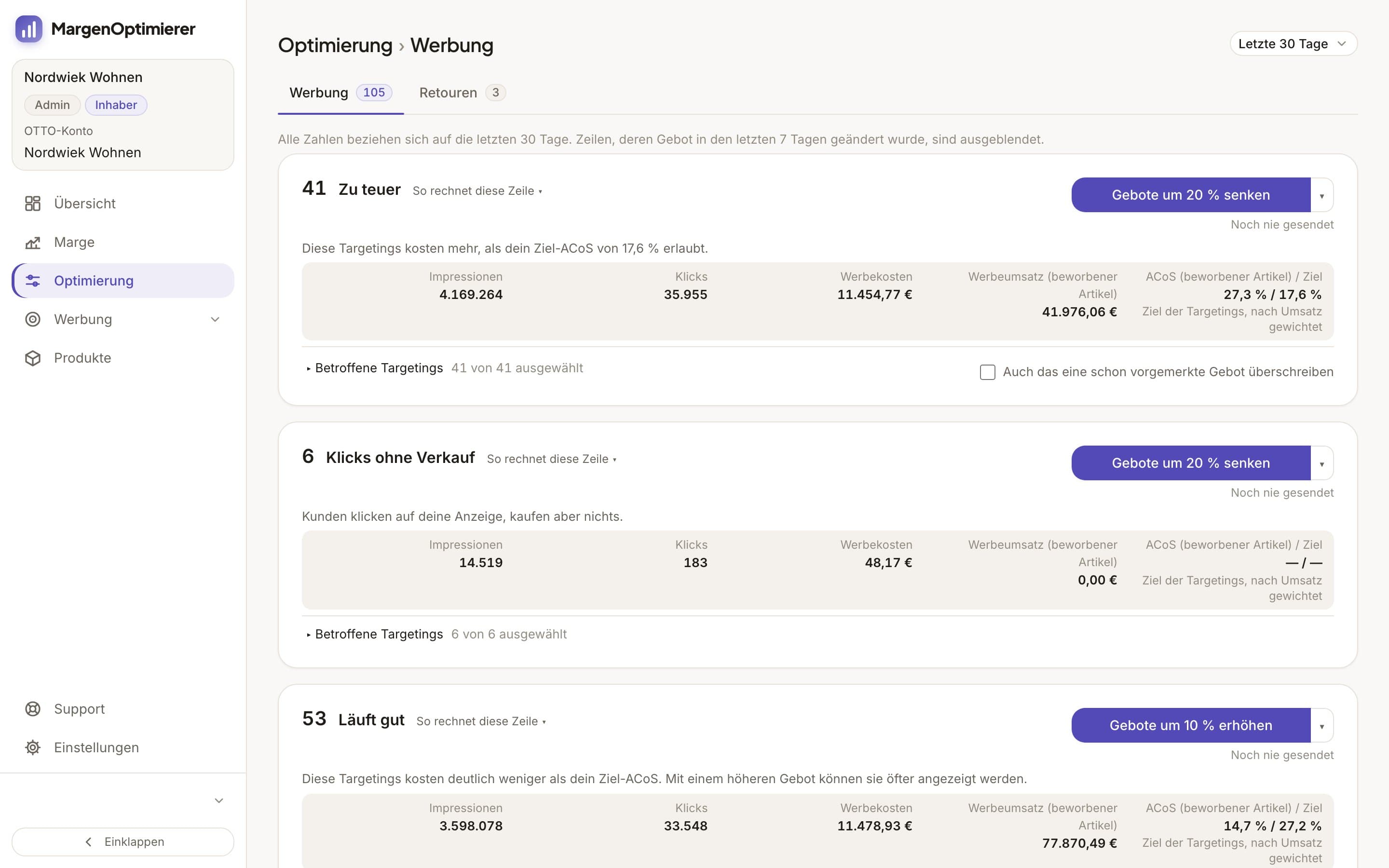
The Optimierung (Optimization) page measures each targeting against its own target and the ACoS of the advertised item. What's above target is in the row „Zu teuer“, what's well below in „Läuft gut“ (Doing well). With one click you lower or raise a row's bids by a percentage and see each new bid beforehand. Nothing goes to OTTO without your click.
You enter your purchase price and shipping once per item. MargenOptimierer calculates the OTTO commission itself. The Marge (Margin) page shows what an item earns after that and after ad spend.
MargenOptimierer costs from 49 € net per month. You can test the first 14 days for free, no credit card needed.
Frequently asked questions
Is there an average ACoS on OTTO?
No. OTTO doesn't publish averages, neither for all sellers nor per category. There are only individual campaigns from OTTO's success stories, with no information on which level was counted. They're no benchmark for your items.
Why does OTTO show two different ACoS figures for the same campaign?
Because OTTO counts at a different level depending on the view. Dashboard and detail report show Brand level by default, with purchases of all items from your brand after a click. If you set the „Conversion-Basis“ in the detail report to „4. Artikel“, only the advertised item counts and ACoS rises.
Keanu Dutado
Keanu Dutado sells on OTTO and other marketplaces with his own company and runs the ads himself. He has several years of e-commerce experience and was an Amazon Ads Manager at Snocksulting / Remazing Nova. He founded MargenOptimierer.
Last updated and sources
Last updated: 5 November 2026
- Sponsored Product Ads, Reporting (Partner Helpdesk, login required), as of 28 October 2026
- Sponsored Product Ads, Allgemeine Informationen (Partner Helpdesk, login required), as of 28 October 2026
- Provision & Gebühren (Partner Helpdesk, login required), as of 28 October 2026
- Abrechnung der Marktplatzgebühren (Partner Helpdesk, login required), as of 28 October 2026
- OTTO Advertising: Leitfaden Sponsored Product Ads (PDF), as of 28 October 2026
- OTTO Market API: Sponsored Product Ads Reporting, as of 28 October 2026
Next
- How do Sponsored Product Ads work on OTTO?
- Which metrics matter for OTTO advertising?
- How do I calculate my profit per item on OTTO?