Is advertising on OTTO worth it for small sellers?

By Keanu Dutado · Last updated: 31 October 2026
In short
Advertising on OTTO can pay off for small sellers too, because there's no fee, only the clicks on your ad, at a minimum of 0.20 € per click. Before you judge an item, OTTO advises 50 € of ad spend on it, so 250 € for 5 items. Whether it then pays off depends on whether you still have money left from a sale after ads, purchase price and OTTO commission, which is OTTO's share of the price. In practice it has proven better to keep ads running continuously with a fixed target than to keep switching them off.
With few items and little money, you worry that ads on OTTO will eat your budget before a sale comes in. Many sellers switch them off again as soon as they look expensive, even though OTTO's own rule of thumb says you can only draw conclusions after 50 € of ad spend per item. On top comes the fixed OTTO base fee, due every month whether you advertise or not.
The minimum cost of advertising on OTTO
Advertising on otto.de is called Sponsored Product Ads. According to OTTO, campaigns have no monthly fees and no upfront fees. You only pay when someone clicks your ad. Your bid is the most you're willing to pay for a click. The minimum bid is 0.20 €, and you're charged the click price you actually reached in the auction.
The budget is the amount a campaign may spend. OTTO names no minimum budget for campaigns you book yourself in the partner portal, but measured on a real OTTO account, OTTO doesn't accept a budget below 5 €. According to OTTO, a minimum booking volume of 2,500 € exists only in Managed Service, where OTTO runs the campaign for you. There's no maximum budget.
Regardless of advertising, every seller on OTTO pays the OTTO base fee of 99.90 € a month plus VAT, however many items they offer. It's first due for the month after you're technically able to sell. That also applies if you haven't loaded any items yet. From every sale, OTTO also keeps an OTTO commission between 7% and 22% of the price including VAT. The total cost is covered in What does it cost to sell on OTTO?
How much budget OTTO names for a first evaluation
OTTO gives a rule of thumb. An item should have had at least 50 € of ad spend before you read anything into its numbers. According to OTTO, only then can you draw first conclusions. To start a campaign, OTTO advises at least 5 items, ideally 15 to 20.
From that you can work out your starting budget. OTTO doesn't print this calculation, it follows from the two recommendations. 5 items times 50 € is 250 € of ad spend until the first evaluation, 15 to 20 items is 750 to 1,000 €. How fast you get there depends on your daily budget and your bids.
What OTTO requires, however big you are
OTTO names no minimum size or minimum revenue for advertising anywhere. You can book campaigns yourself, without support from OTTO. Only an item where you hold the BuyBox can take part in the bidding, meaning OTTO offers your offer for purchase on the product page. If an item counts as sold out because fewer than half of its variants are available, OTTO doesn't show it.
Besides the bid, what counts in the auction according to OTTO is how likely a click on your product is. That includes price, shipping costs, delivery time and your product data. OTTO doesn't mention the size of your shop. You can't bid on other sellers' brands.
Whether advertising pays off for your item
Whether ads pay off is decided by your item, not your account. From the price of a sale, VAT, OTTO commission, purchase price and shipping come off. OTTO doesn't know your purchase price and shipping, they're in your own records. What's left is your room for advertising. If you spend more on ads for a sale than that, you lose money on it.
You measure this with ACoS, the share of your ad spend in ad revenue, meaning revenue from purchases after a click on your ad. OTTO shows it in the partner portal as „KUR (ACoS)“, where KUR stands for Kosten-Umsatz-Relation (cost-to-revenue ratio). The break-even ACoS is the ACoS at which you stop earning on a sale. It's your room for advertising divided by the price. If 35 € of a 100 € price is left before ads, it's 35%. Your target ACoS sits below that, the highest ACoS at which you still keep the margin you want. How to calculate your target ACoS has its own guide.
What OTTO says about ads and regular search
OTTO writes that Sponsored Product Ads could have positive effects on organic ranking, which is your place in regular search without ads. OTTO's advertising guide explains it like this. More clicks and sales raise your product's relevance, and it then ranks higher in regular search too. OTTO publishes no evidence for this, only individual case studies of campaigns from 2024. One of them also says that after the campaign ends, the gain gets “nibbled at” by competitors. What OTTO sorts regular search by is covered in How does the OTTO search algorithm work?.
In practice ads and sales without ads are still connected. Many sellers keep switching ads on and off because they look expensive. If you switch off, you hand your spot to competitors and can also lose places in regular search. It's better to keep ads running continuously, with a target ACoS per item against which you lower or raise bids.
How to check today on OTTO whether ads pay off
You'll find all of this in OTTO Partner Connect, the partner portal for sellers.
- Open „Marketing“ → „Sponsored Product Ads“ and the tab „Prognose-Report“ (Forecast report). For each item it names an „Empfohlenes CPC Gebot“ (recommended CPC bid), meaning a bid per click, plus how often OTTO would show the ad and how much competition there is. It also shows the „Erwartete Return on Investment der Produktgruppe“ (expected return on investment of the product group), the ROAS of similar items over the last 90 days. ROAS is your ad revenue divided by your ad spend.
- Work out your starting budget, the number of items times 50 €. For each item, work out what's left of the price after VAT, OTTO commission, purchase price and shipping. Take purchase price and shipping from your own records. What's left is the upper limit for your ad spend per sale.
- Book the campaign, according to the Helpdesk under „Marketing“ → „Marketing Services buchen“ (Book marketing services) → „Jetzt buchen“ (Book now). There you set the name, budget, items and bids. The step-by-step version is in How does advertising on OTTO work with Sponsored Product Ads?
- Check the result under „Marketing“ → „Sponsored Product Ads“ in the „Dashboard“ tab. It lists spend, clicks, CPC, revenue, ROAS and „KUR (ACoS)“ per campaign. CPC is the average price of a click.
- You see your place in regular search under „Analysen“ (Analytics) → „Potenzialanalysen“ (Potential analyses) → „Suchbegriff Analyse“ (Search term analysis) in the tab „Suchbegriffe nach Produkt“ (Search terms by product). Enter the OTTO item number and you'll see the search terms of the last 30 days with your product's average position. This costs nothing and needs no campaign.
- According to the Helpdesk, your total revenue, including revenue without ads, is under „Analysen“ → „Controlling“ → „Nachfrage- und Umsatz-Analysen“ (Demand and revenue analyses).
OTTO doesn't show you whether ads improve your place in regular search. You won't find a metric in the partner portal that separates sales from ads and sales without ads. You have to save the position of your search terms yourself before, during and after a campaign and compare, because OTTO only ever shows the last 30 days. You also calculate TACoS yourself, the share of your ad spend in your total revenue. A sale from an ad appears in OTTO's ad numbers on the day of the click, but under „Controlling“ on the day the goods were shipped. So the numbers don't match exactly.
How to work out your starting budget for ads on OTTO
Say you start with 5 pieces of garden furniture in one campaign, including the oak table. It costs 100 €, and after VAT, OTTO commission, purchase price and shipping you have 35 € left before ads. Its break-even ACoS is therefore 35%. Your garden furniture has a target ACoS of 25%, and your bid is 0.40 €.
| Line item | Amount |
|---|---|
| Items to start with, as OTTO recommends | 5 |
| Ad spend until the first evaluation (5 × 50 €) | 250 € |
| OTTO base fee per month, even without ads | 99.90 € plus VAT |
| Clicks for 50 € on the table, at no more than 0.40 € per click | at least 125 |
Don't judge the table before that. Only once it has had 50 € of ad spend do you check how many tables sold through the ad. At a 25% target ACoS, 50 € of ad spend should bring 200 € of ad revenue.
| Tables through the ad | Ad revenue | ACoS | What you keep |
|---|---|---|---|
| 1 | 100 € | 50% | 15 € loss (35 € minus 50 €) |
| 2 | 200 € | 25% | 20 € (70 € minus 50 €), exactly on target |
| 3 | 300 € | 17% | 55 € (105 € minus 50 €), well below target |
If the table has sold once after those 50 €, you're above target and lower its bid. With three tables sold you're well below target and can raise the bid. Either way you change the table's bid and don't switch off the whole campaign.
How to steer small budgets on OTTO with MargenOptimierer
For MargenOptimierer you connect your OTTO account, enter your targets and add purchase price and shipping per item. You set your targets for your OTTO account and, where needed, for a product group or a campaign. MargenOptimierer then fetches your campaigns and ad numbers from OTTO and measures every targeting against your target ACoS. A targeting is what you set a bid on, an item or a keyword.
On the Optimierung (Optimization) page, your targetings sit in four rows in the Werbung (Advertising) tab. In „Zu teuer“ (Too expensive) the ACoS is above target ACoS, in „Klicks ohne Verkauf“ (Clicks without a sale) the clicks brought no sale. In „Läuft gut“ (Going well) the ACoS is well below target, in „Kaum gesehen“ (Hardly seen) OTTO rarely shows the ad. That lets you lower the bids that use up your budget and raise the ones well below target, without switching off your ads. By default, MargenOptimierer only rates a targeting from 10 clicks in the period, below that it sits in „Kaum gesehen“ at most. Those 10 clicks apply to a single targeting, while OTTO's 50 € rule of thumb applies to a whole item. To follow OTTO's rule of thumb, pick a period in which the item had 50 € of ad spend, or set the minimum clicks higher.
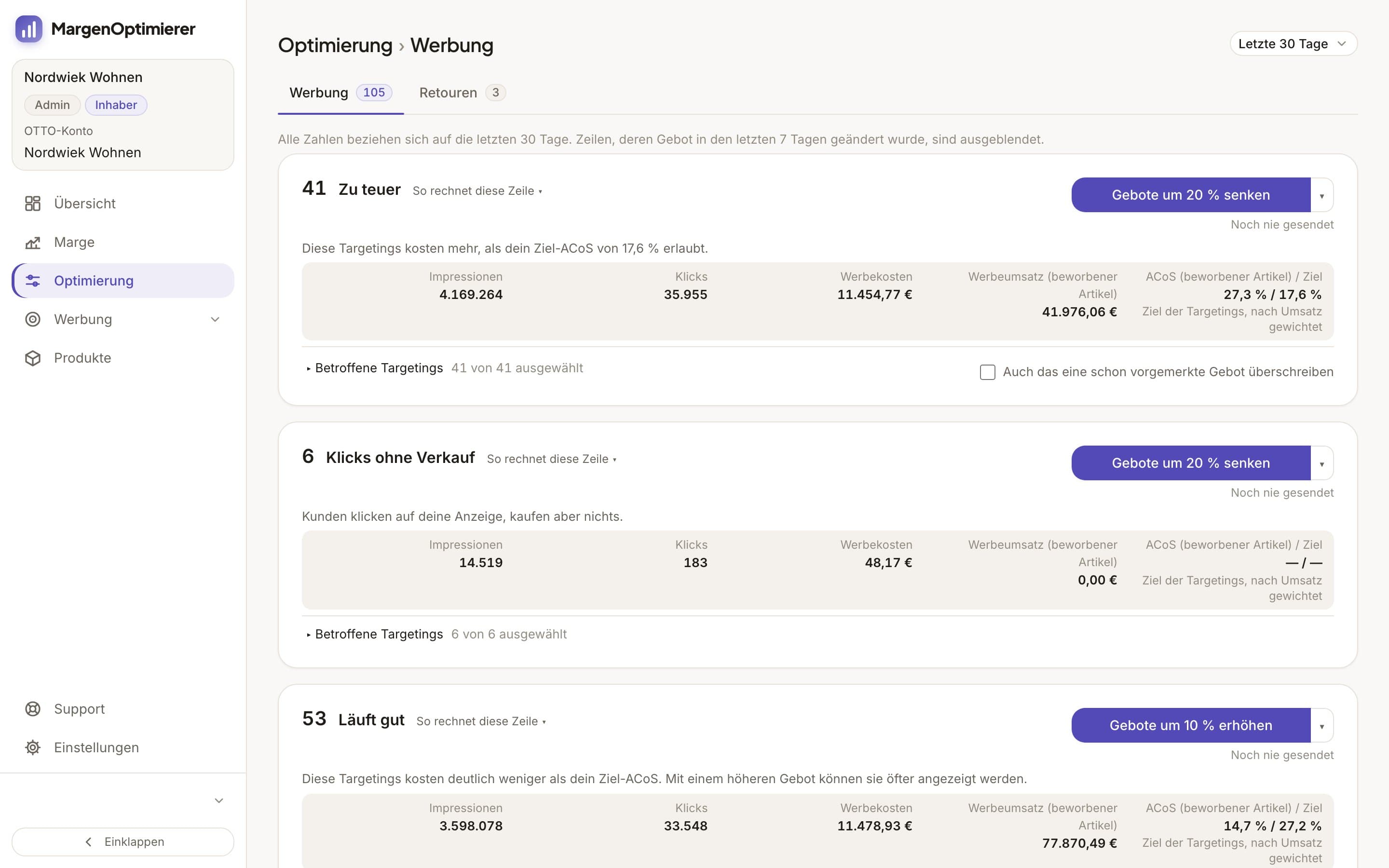
A click on a button like Gebote um 20 % senken (Lower bids by 20%) queues new bids, and you see the new one next to every bid beforehand. A bid only goes to OTTO after your click, and none drops below OTTO's minimum bid.
On the Marge (Margin) page you see for every item what you keep after VAT, OTTO commission, ad spend, refunds and your own costs, and for your whole account after the OTTO base fee as well. The calculation from the worked example is ready there for every item. The Übersicht (Overview) shows your total revenue with the share from ads, plus TACoS and a comparison with the previous period.
MargenOptimierer costs from 49 € net per month. You can test the first 14 days for free, no credit card needed.
Frequently asked questions
Is there a minimum ad budget on OTTO?
No, OTTO names none for campaigns you book yourself. Measured on a real OTTO account, though, OTTO doesn't accept a budget below 5 €, and a click costs at least 0.20 €. The 2,500 € applies only to Managed Service, where OTTO runs the campaign.
Do ads on OTTO improve my ranking in regular search?
OTTO says ads could have positive effects on it, but publishes no data. In practice ads and sales without ads are connected, and if you switch off your ads you can also lose places in regular search. You can measure it yourself with the position of your search terms in the „Suchbegriff Analyse“.
How many items do I need for ads on OTTO?
OTTO advises at least 5 items per campaign, ideally 15 to 20. There's no minimum size for your shop. Each item needs the BuyBox, otherwise it doesn't take part in the bidding.
Keanu Dutado
Keanu Dutado sells on OTTO and other marketplaces with his own company and runs the ads himself. He has several years of e-commerce experience and was an Amazon Ads Manager at Snocksulting / Remazing Nova. He founded MargenOptimierer.
Last updated and sources
Last updated: 31 October 2026
- OTTO Advertising: Sponsored Product Ads, as of 7 August 2026
- OTTO Advertising: SPA-Leitfaden (PDF, August 2026 version), as of 28 October 2026
- OTTO Advertising: Fallstudie zum organischen Ranking, as of 5 March 2026
- Sponsored Product Ads, Kosten und Abrechnung (Partner Helpdesk, login required), as of 13 August 2026
- Sponsored Product Ads, Allgemeine Informationen (Partner Helpdesk, login required), as of 7 May 2026
- Sponsored Product Ads, Kriterien zur Ausspielung (Partner Helpdesk, login required), as of 7 May 2026
- Provision und Gebühren (Partner Helpdesk, login required), as of 20 October 2026
- Ablauf der Anbindung an OTTO Market (Partner Helpdesk, login required), as of 2 July 2026
- Buchung und Erstellung von SPA-Kampagnen (Partner Helpdesk, login required), as of 25 June 2026
- Nachfrage- und Umsatz-Analysen (Partner Helpdesk, login required), as of 19 August 2026
- Suchbegriff Analyse (Partner Helpdesk, login required), as of 31 March 2026
Next
- How do Sponsored Product Ads work on OTTO?
- What does it cost to sell on OTTO?
- How does the OTTO search algorithm work?