How do Sponsored Product Ads work on OTTO?

By Keanu Dutado · Last updated: 7 November 2026
In short
Advertising on OTTO means Sponsored Product Ads, among sellers also called OTTO Ads. They promote individual items on otto.de, and you pay per click from 0.20 €. Only an item where you hold the BuyBox can bid, meaning OTTO offers your listing for purchase on the product page. In an automatic campaign OTTO picks the searches. In a manual campaign you book the keywords your item should appear for yourself. OTTO credits a click with the purchases of the next 14 days and by default counts the revenue of your whole brand, VAT included.
OTTO shows you an ACoS for every campaign, and it often looks good because it counts the revenue of the whole brand. A targeting is what you put a bid on, so an item or a keyword. Which targeting sits above your target ACoS is something you have to work out yourself from several reports. That's why many campaigns keep running with targetings that cost more than they should.
Where ads appear on OTTO
OTTO shows Sponsored Product Ads in search results, in product lists and on product detail pages, on desktop, on mobile and in the app. OTTO builds the ad itself from your item's data, so you don't have to design anything.
Search results and product lists have at most 11 ad slots, at positions 1, 2, 8, 16, 24, 32, 40, 48, 56, 64 and 72. A product detail page has at most 30. According to OTTO, half of all customers only scroll as far as position 30 in a product list. You can't bid a premium for a specific slot on OTTO.
How OTTO auctions its ad slots
An auction runs on every page view. In it, OTTO determines the winners and the click price each of them pays. Your bid is the most you're willing to pay for a click. The minimum bid is 0.20 €.
Besides the bid, OTTO says it also looks at how attractive your product is. Well-rated products are meant to get clicks at a lower price. Only an item where you hold the BuyBox enters the auction. If an item counts as sold out because fewer than half of its variants are available, OTTO doesn't show it.
Automatic and manual campaigns on OTTO
OTTO has two campaign types. You choose one when you create the campaign and can't change it afterwards.
In an automatic campaign, OTTO itself chooses the searches and pages your item appears on. It runs in search results, in product lists and on product detail pages. You set one bid per item. Only here can you exclude search terms. Only here do you also get OTTO's „Intelligentes Bieten“ (smart bidding), where OTTO adjusts your bid daily, up to at most the amount you set.
OTTO chooses the searches for an automatic campaign based on your listing. How well it runs therefore depends on whether your listing contains the words customers actually search for. In practice, many sellers only describe the product, written by hand or with AI, and leave out the words people search for.
In a manual campaign you book keywords. These are the words your item should appear for when someone searches them. It runs in search results only. You set one bid per keyword, and a campaign holds at most 2,500 keywords.
OTTO recommends starting with an automatic campaign and adding a manual one as soon as you know your keywords. In practice, many sellers create both for a single item or a group of similar items instead of putting their whole range into one campaign. Which one suits which situation is covered in Should I advertise on OTTO automatically or with keywords?
The three match types on OTTO
In a manual campaign you choose a match type for every keyword. It sets how closely a customer's search has to match your keyword. In the partner portal the three are called „Exact“, „Phrase“ and „Broad“.
- Exact means the keyword “gartenstuhl” usually only matches the search “gartenstuhl”.
- Phrase means “gartenstuhl holz” matches too, because the keyword appears in that order in the search.
- Broad means similar searches like “gartenstühle” can also match.
You can exclude search terms as exact or phrase. Negative keywords for a whole campaign or a whole account don't exist. Negative keywords are always attached to a single item.
Budget and billing on OTTO
The budget sets how much a campaign may spend. On OTTO it's either time-limited with a total amount or ongoing with an amount per day, week or month. You also choose whether OTTO spreads it evenly or spends it as fast as possible. The budget type can't be changed later either. OTTO doesn't accept a budget under 5 €.
You pay the click price you actually reached in the auction. It's at most your bid and often lower. A month's ad spend arrives as an invoice on the 2nd of the following month under „Finanzen“ (Finance) → „Servicegebühren“ (Service fees), with VAT, settled through OTTO Payments.
How OTTO attributes sales to a click
When a customer clicks your ad, OTTO credits it with the matching purchases of the next 14 days. A purchase without a click on an ad never counts. What counts as matching is something you choose in a campaign's detail report, on four levels.
| Level at OTTO | What counts |
|---|---|
| Item | The customer buys exactly the item they clicked. |
| Campaign | They buy an item from the same campaign. |
| Assortment | They buy an item of the same brand and the same assortment, at OTTO also called „gleiche Marke und Produktgruppe“ (same brand and product group). |
| Brand | They buy any item of the same brand from you, whatever the assortment. |
OTTO's default is brand. The ad revenue then includes the acacia chairs a customer buys after clicking the ad for the oak table. Items of another brand of yours don't count. OTTO calculates ad revenue using the price the buyer pays, so with VAT. The ad spend in the report is without VAT. If you work out your target ACoS from your margin, use the gross price.
ACoS is ad spend as a share of ad revenue. The brand's revenue is larger than the single item's revenue. That's why the ACoS OTTO shows you by default is lower than the ACoS of the advertised item.
OTTO counts a purchase on the day of the click. A day's ad revenue can therefore keep growing for two weeks while the ad spend stays the same. So the ACoS of the last 14 days isn't final yet and can still fall.
What's different on OTTO compared with Amazon
On Amazon the counterpart is called Sponsored Products. OTTO is structured differently.
- There are no ad groups. Directly under the campaign sit the targetings, meaning the items and keywords you bid on.
- A targeting applies per item. If you advertise 10 items with 10 keywords each, that's 100 targetings. On Amazon it would be 10 targetings in one ad group, with numbers that mix all the items. On OTTO you can follow performance down to the single item, but setting it up is more work.
- There are no portfolios. On Amazon a portfolio is a group of campaigns you put together by theme or season and evaluate together. On OTTO every campaign stands alone.
- There's no premium for the top search positions.
- A targeting's performance doesn't sit next to its bid. It's spread across several reports.
How to tell whether an OTTO campaign is working
Every campaign has a goal. If you want to get known, you measure impressions, meaning how often OTTO shows your ad. If you want to sell at a profit, you measure ACoS. For that you set a target ACoS, the highest ACoS at which you still keep the margin you want. Roughly, it's the share of the gross price left to you before ad spend, minus the margin you want to keep. Which metrics OTTO shows you for this is covered in Which metrics matter for OTTO advertising? How to work out your target ACoS exactly is covered in What is a good ACoS on OTTO, and how do I calculate it?
If the ACoS is below target, you can raise the bid. If it's above, you lower it. Judge each targeting, not just the whole campaign. In an automatic campaign you lower or raise the item bids and exclude search terms with no sales. In a manual campaign you move each targeting up or down individually. OTTO advises judging an item only once it has had at least 50 € of ad spend. When to lower and when to raise is covered in When should I lower and raise bids on OTTO?
In practice, these mistakes come up often.
- A campaign is above target and gets switched off entirely. Often three or four targetings spoil the average and the rest is doing well.
- There's no target. Many sellers don't know which ACoS is still profitable for them.
- Campaigns run with no upkeep at all.
- Ads get switched off and on again because they feel expensive. According to OTTO, sales through ads can improve your position in the regular search. If you switch off, you hand your position to competitors. How OTTO sorts the regular search is covered in How does OTTO's search algorithm work?.
How to create an OTTO campaign today
You book ads in OTTO Partner Connect, the partner portal for sellers.
- Open „Marketing“ → „Marketing Services buchen“ (Book marketing services) and click „Jetzt buchen“ (Book now).
- Give the campaign a name and choose the brand.
- Set the budget and schedule and choose how OTTO spreads the budget.
- Choose whether to create an automatic or a manual campaign.
- Choose the items through the search, a list or a CSV file. OTTO advises at least 5 items, and 15 to 20 to start with.
- Set the bids for all items at once or per item. OTTO suggests a bid based on the bids of the last 7 days, one that wins about half of all auctions.
- In an automatic campaign, enter the search terms you want to exclude and click „Buchung abschließen“ (Complete booking).
In a manual campaign you book the keywords per item with match type and bid, also by CSV file. You can change or pause a campaign under „Marketing“ → „Sponsored Product Ads“ in the „Dashboard“ tab, using the „Bearbeiten“ (Edit) and „Pausieren“ (Pause) icons in its row. „Bearbeiten“ opens the campaign's steps. In an automatic campaign the item bids are in step „2 Produktauswahl“ (Product selection), and in a manual campaign the keyword bids are in step „3 Keywords & Gebote festlegen“ (Set keywords & bids). In both steps you download the targetings with „CSV-Download“, and „CSV-Upload“ sits right next to it.
How to find search terms for your manual OTTO campaign
Under „Analysen“ (Analytics) → „Potenzialanalysen“ (Potential analyses) → „Suchbegriff Analyse“ (Search term analysis), OTTO shows what customers search for on otto.de. You don't need any ads for this.
- The „Top Suchbegriffe“ (Top search terms) tab shows the 100,000 most requested search terms of the last 7, 30, 90, 180 or 365 days. For each one you get the search volume as a range, such as 100,000 to 200,000, the trend and the number of products. You can filter by assortment and download the list.
- The „Suchbegriffe nach Produkt“ (Search terms by product) tab shows which search terms a product was found under in the last 30 days, with its average position. The field expects the OTTO item number, not your SKU and not the EAN.
In practice, you pick four or five competitor products similar to yours and enter their item numbers under „Suchbegriffe nach Produkt“. You add the matching search terms to your list and roughly estimate how often people search for them. The same words belong in your listing too, because that's what OTTO uses to choose the searches for the automatic campaign.
How to read OTTO's reports today
The reports are under „Marketing“ → „Sponsored Product Ads“ in the tabs „Dashboard“, „Kampagnen-Report“ (Campaign report), „Artikel-Report“ (Item report), „Verkäufe-Report“ (Sales report) and „Prognose-Report“ (Forecast report). Each campaign has a detail report, opened in the „Dashboard“ tab with the „SPA Kampagnendetailreport“ (SPA campaign detail report) icon in the campaign's row, or in the „Artikel-Report“ tab through the „Detailreport“ (Detail report) column. It has the tabs „Gesamt Report“ (Overall report), „Keyword Report“, „Artikel Report“ (Item report) and „Sales Report“. In the partner portal you can currently choose the whole „Kampagnenzeitraum“ (Campaign period) there, while the Helpdesk still gives at most 30 days for the Keyword Report. You can download the reports as CSV files and have the detail report emailed to you every week or month with „E-Mail-Report abonnieren“ (Subscribe to email report).
OTTO shows you ACoS as „KUR (ACoS)“, by default at brand level. What a single targeting costs and brings in is something you calculate yourself.
- In the detail report, set „Conversion-Basis“ (conversion basis) from „1. Marke“ (brand) to „4. Artikel“ (item).
- Download the Keyword Report and the Item Report of every campaign.
- In each row, divide the spend, meaning your ad spend, by the revenue. That's the targeting's ACoS.
- Write your target ACoS for the item next to it and mark whatever is above.
- Leave out the last 14 days because their ad revenue can still grow.
You do this again for every campaign and every period. With many items and keywords, it quickly turns into a very large spreadsheet.
How to calculate a garden table's ACoS on two levels
Say you advertise the oak table for 100 € in your manual campaign with the keyword “gartentisch eiche”. Your bid is 0.50 €. Your garden furniture has a target ACoS of 25%. All numbers are an example and come from days more than 14 days back.
| Line | Amount |
|---|---|
| Clicks | 680 |
| Average click price | 0.50 € |
| Ad spend (680 × 0.50 €) | 340 € |
| Ad revenue, item (10 tables × 100 €) | 1,000 € |
| ACoS, item (340 € ÷ 1,000 €) | 34% |
| Ad revenue, brand (plus 3 acacia chairs × 119 €) | 1,357 € |
| ACoS, brand (340 € ÷ 1,357 €) | about 25% |
| Target ACoS | 25% |
At brand level the ACoS of about 25% is exactly on target. The table itself is at 34%. At 25%, 1,000 € of ad revenue should carry at most 250 € of ad spend, so the targeting is 90 € above target. For the bid, what counts is what this item itself sells. So you lower the bid, for example by 20% to 0.40 €, and look at the targeting again after another two weeks.
How to steer your OTTO ads with MargenOptimierer
MargenOptimierer fetches your campaigns and ad numbers from OTTO and puts each targeting with its numbers next to its bid and target ACoS. The calculation from the example is then ready for every targeting, for the period you choose. If you choose the last 30 days, the most recent 14 of them aren't final yet and their ad revenue can still grow.
On the Optimierung (Optimization) page, your targetings sit in four rows in the Werbung (Advertising) tab. In „Zu teuer“ (Too expensive) the ACoS is above the target ACoS, in „Läuft gut“ (Performing well) it's clearly below. Then there are „Klicks ohne Verkauf“ (Clicks without a sale) and „Kaum gesehen“ (Barely seen). In „Zu teuer“ and „Klicks ohne Verkauf“ you lower bids, in „Läuft gut“ and „Kaum gesehen“ you raise them. Each row says how it calculates. As in the example, it measures against the revenue of the advertised item, in the column „ACoS (beworbener Artikel) / Ziel“ (ACoS of the advertised item / target).
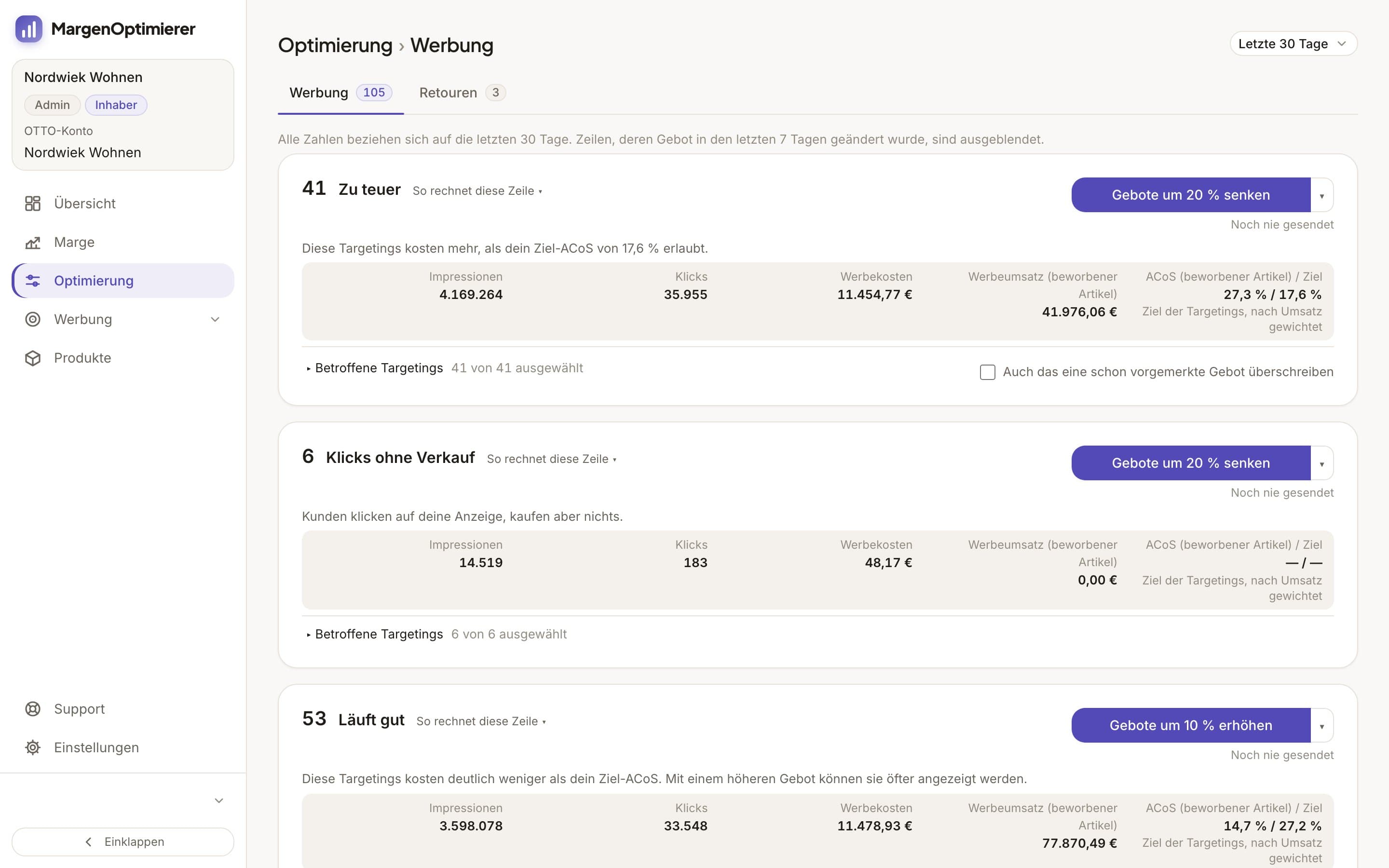
One click on a button like Gebote um 20 % senken (Lower bids by 20%) queues new bids for all selected targetings in that row. You see the new bid next to each current bid first. Then you choose Jetzt an OTTO senden (Send to OTTO now) or Erst in den Changelog (Changelog first). A bid only goes to OTTO after your click, and none drops below OTTO's minimum bid.
You set your targets for your OTTO account, a product group and a campaign. A product group brings similar items together, such as all garden chairs in one group and all garden tables in another. In Kampagnen-Setup (Campaign setup) you create an automatic and a manual campaign for a group in one go, the manual one with the group's keywords. With portfolios you bundle campaigns by theme or season and see their numbers together. On the Marge (Margin) page you also see what an item still earns after ads, OTTO commission and returns. OTTO doesn't show you that.
MargenOptimierer costs from 49 € net per month. You can test the first 14 days for free, no credit card needed.
Frequently asked questions
What's the minimum cost of advertising on OTTO?
A click costs at least 0.20 €, which is OTTO's minimum bid. OTTO doesn't accept a budget under 5 €. There's no separate fee for ads, you only pay for clicks. The OTTO base fee is independent of that. Whether ads pay off on a small budget is covered in Is advertising on OTTO worth it for small sellers?
Can I bid on competitors' brands on OTTO?
No. OTTO doesn't allow bids on other brands. Your ad doesn't appear in search results and product lists for another brand either. It can appear on the product detail pages of other sellers' items.
Does OTTO have a report like Amazon's Search Term Report?
Yes, OTTO calls it the „Keyword Report“. It's in every campaign's detail report and shows in the „Customer Search Term“ column which search terms customers used to find your products. In the partner portal you can currently choose the whole „Kampagnenzeitraum“ for it. How to evaluate it is covered in How do I analyse search terms in OTTO's Keyword Report?
Keanu Dutado
Keanu Dutado sells on OTTO and other marketplaces with his own company and runs the ads himself. He has several years of e-commerce experience and was an Amazon Ads Manager at Snocksulting / Remazing Nova. He founded MargenOptimierer.
Last updated and sources
Last updated: 7 November 2026
- OTTO Advertising: Sponsored Product Ads, as of 28 October 2026
- OTTO: Pressemitteilung zum Start von Sponsored Product Ads, as of 28 October 2026
- OTTO: Pressemitteilung zum Keyword Targeting für Sponsored Product Ads, as of 28 October 2026
- Sponsored Product Ads, Allgemeine Informationen (Partner Helpdesk, login required), as of 7 May 2026
- Sponsored Product Ads, Kosten und Abrechnung (Partner Helpdesk, login required), as of 13 August 2026
- Sponsored Product Ads, Kriterien zur Ausspielung (Partner Helpdesk, login required), as of 28 October 2026
- Sponsored Product Ads, Buchung und Erstellung von Kampagnen (Partner Helpdesk, login required), as of 25 June 2026
- Sponsored Product Ads, Reporting (Partner Helpdesk, login required), as of 13 July 2026
- Analyse und Optimierung von SPA-Kampagnen (Partner Helpdesk, login required), as of 28 October 2026
Next
- Which metrics matter for OTTO advertising?
- What is a good ACoS on OTTO, and how do I calculate it?
- Should I use automatic or keyword campaigns on OTTO?
- When should I lower or raise bids on OTTO?
- How do I analyse search terms in OTTO's Keyword Report?
- How does the OTTO search algorithm work?
- Is advertising on OTTO worth it for small sellers?
- What are Sponsored Display Ads on OTTO?