Where do I find my returns on OTTO?

By Keanu Dutado · Last updated: 31 October 2026
In short
OTTO Partner Connect, the partner portal for sellers, has no menu of its own for returns. Which orders came back is under „Aufträge“ (Orders) in the „Retourniert“ (Returned) tab. Registered returns with your customer's reason and the return rate, meaning units sent back divided by units sold, are under „Analysen“ (Analytics) → „Logistik“ (Logistics). What a return cost is on separate documents under „Finanzen“ (Finance), and OTTO offers no ready-made report on return costs.
At OTTO your returns are spread across about a dozen places in four areas, namely „Aufträge“, „Analysen“, „Finanzen“ and the API for software. Each place shows a different slice, with its own period and its own download. If you don't know what's where, you'll miss the deadline for a delivered return or won't notice which item is costing you money through returns.
Where OTTO puts your returns
The OTTO Partner Connect menu has no main item called „Retouren“ (Returns). The table shows where to find what. The names are as OTTO writes them, and the routes have been clicked through in the partner portal. OTTO gives deadlines, processes and the content of the documents in its Partner Helpdesk, which is where these details in this article come from.
| What you want to know | Where it is at OTTO |
|---|---|
| Which orders came back | „Aufträge“ → „Auftragsübersicht“ (Order overview), „Retourniert“ tab |
| When you accepted a return | In the order details in the „Auftragshistorie“ (Order history) tab |
| The document for the refund to the customer | In the order details in the „Belege“ (Documents) tab |
| Registered returns, their status and the customer's reason | „Analysen“ → „Logistik“ → „Logistik Details“ (Logistics details), „Retourendetails“ (Return details) tab, „Kundenretouren“ (Customer returns) sub-tab |
| The reasons per item | Same tab, „Retourengründe“ (Return reasons) sub-tab |
| The return rate per item | Same tab, „Retourenquote“ (Return rate) sub-tab |
| Whether you process your returns on time | „Analysen“ → „SLA & Verstöße“ (SLA & violations), tile „Verspätete Retourenbearbeitungsquote“ (Late return processing rate) |
| What was refunded to customers and what OTTO gives back to you | „Finanzen“ → „Zahlungsbelege“ (Payment statements), „Marktplatzgebühren“ (Marketplace fees) and „Paymentgebühren“ (Payment fees) |
Two more places are only described by the Helpdesk. Under „Aufträge“ → „Kundenbelege“ (Customer documents) you download all refund documents to customers as PDF and CSV. Under „Analysen“ → „Controlling“, the demand and revenue analyses show the value of your returns in euros per item.
OTTO updates the return data once a day, usually between midnight and 6 a.m.
How a return moves through OTTO
Your customer registers the return with OTTO themselves. They'll find the return label in their OTTO customer account. From registration on, the return appears under „Kundenretouren“, but not yet in the order overview.
Under „Kundenretouren“ you filter by the statuses „Angekündigt“ (Announced), „Unterwegs zu Ihnen“ (On its way to you), „Irrläufer“ (Misdirected), „Zugestellt“ (Delivered) and „Bearbeitet“ (Processed). By default OTTO only shows „Unterwegs zu Ihnen“. If you want the whole list, you have to change the filter.
Once the parcel has reached you, you have 2 working days to accept or reject the return. The 2 working days start with the working day after delivery. For freight goods, meaning goods brought by a freight carrier instead of a parcel carrier, you collect the return yourself and for free from the customer and have 7 working days from collection. When you accept or reject, you enter the condition of the goods and a reason. Only a return that has been accepted or rejected appears in the order overview in the „Retourniert“ tab.
How punctual you are is measured by OTTO under „SLA & Verstöße“. More than 85% of your delivered returns in a calendar month should be processed within 2 working days. OTTO puts it the other way round, as a limit of 15% late returns.
Three return rates on OTTO
OTTO always calculates the return rate in units, never in euros. Depending on the place, OTTO calculates it differently.
| Where | How OTTO calculates |
|---|---|
| „Logistik Details“, setting „Standard“ | A day's returns divided by the units sold that same day. Values above 100% are possible. |
| „Logistik Details“, setting „Absatzbezogen“ (Sales-based) | Each return counts for the day its item was shipped. |
| „Marketing“ → „Sponsored Product Ads“ → „Prognose-Report“ (Forecast report) | Units sent back in the last four months divided by all units ordered. |
So when you compare two return rates, first check where they come from.
Two kinds of reasons
At OTTO a return has two reasons. Your customer picks one when registering, from a fixed list, for example „Produkt passte nicht“ (Item didn't fit), „Produkt entsprach nicht der Beschreibung“ (Item didn't match the description) or „Produkt war defekt, beschädigt oder funktionsunfähig“ (Item was defective, damaged or not working). You see this reason under „Kundenretouren“ and „Retourengründe“, but not in the order overview.
You enter the other one yourself when you accept or reject the return. Along with it you enter the condition of the goods, meaning how good the returned goods still are. OTTO has five levels for this, „Originalverpackt“ (Original packaging), „Wie neu“ (Like new), „Leicht gebraucht“ (Lightly used), „Stark gebraucht“ (Heavily used) and „Irrtum“ (Error).
What OTTO shows you in terms of money
What a return cost is on three kinds of documents, each with its own rhythm.
- Under „Finanzen“ → „Zahlungsbelege“, a statement arrives every week. It lists the refund to the customer, the OTTO commission given back and the payment fee given back as separate lines.
- Under „Finanzen“ → „Marktplatzgebühren“, every Wednesday there's a „Rechnungskorrektur“ (invoice correction) next to the invoice. With it OTTO gives you back the OTTO commission for accepted returns, as PDF and CSV.
- Under „Finanzen“ → „Paymentgebühren“, every week there's a separate document on the payment fee OTTO gives back for returns. OTTO writes that it comes back in full or in part, but doesn't say when which applies.
If you only give your customer a price reduction and they keep the goods, there's no Rechnungskorrektur, because OTTO keeps the OTTO commission and the payment fee in full. What the return shipping costs you isn't at OTTO at all, it's on your parcel carrier's invoice. OTTO expressly doesn't provide reports other than those named in the Helpdesk.
How to find your returns in OTTO's partner portal today
- Open „Aufträge“ → „Auftragsübersicht“ and the „Retourniert“ tab. The filter is „Auftragsdatum“ (Order date), so by the day of the order, not of the return. That's why you look up individual orders here, and you'll find the returns of a period in step 3. Expand a position and you see whether the return was accepted by you or by OTTO. There's no export here, and you page through at most 100 rows per page.
- Click an order number. The „Auftragshistorie“ tab shows „Retoure akzeptiert“ (Return accepted) with date and time. In the „Belege“ tab you download the refund as a single PDF.
- Open „Analysen“ → „Logistik“ → „Logistik Details“ and the „Retourendetails“ tab. The numbers at the very top always count the last 90 days from the return's registration. Below that you choose the period yourself, such as the last 30 days. In the sub-tabs „Kundenretouren“, „Retourengründe“ and „Retourenquote“ you download one CSV file each with „Download“.
- Open „Analysen“ → „SLA & Verstöße“ and click the „Verspätete Retourenbearbeitungsquote“ tile. The table gives the latest processing date for each return and whether you were on time.
- Under „Finanzen“, download the Zahlungsbelege, the Rechnungskorrekturen under „Marktplatzgebühren“ and the documents under „Paymentgebühren“, week by week. They list the items per return. Then, under „Kontoauszüge“ (Account statements), use „Auszug erstellen“ (Create statement) to create a CSV file with opening and closing balance for a period of your choice, and use it to reconcile the total of the weekly documents.
- Combine everything in a spreadsheet. You connect the rows through the order number, the position ID, meaning OTTO's number for a single item in the order, and the SKU, your own number for the item. Under „Kundenretouren“ the columns are called „Auftragsnummer“, „Auftrags-Position-ID“ and „SKU“, in the CSV of the Rechnungskorrektur „AuftragsNr“, „PositionItemId“ and „SKU“. Add the return shipping from your parcel carrier's invoice.
Each place counts a different period. The „Retourniert“ tab filters by order date, the return details count 90 days from registration, late processing counts per calendar month, and the documents come week by week. A return rate in euros, the cost of returns per item or the comparison with your ad spend is something you calculate yourself. In practice, return shipping and warehouse handling are often missing from this calculation because neither is at OTTO. Which tools take the combining off your hands is covered in What software is there for OTTO sellers?
Pulling together the returns of a garden chair on OTTO
Say you want to know how the returns of your acacia chair for 119 € look over the last 30 days, from 27 September 2026 to 26 October 2026. Your account has a target return rate of 8%, so at most 8 out of 100 units sold. All numbers are an example.
| What | Where at OTTO | Value |
|---|---|---|
| Chairs shipped | „Logistik Details“, „Retourenquote“ sub-tab, „Versendet“ (Shipped) column | 50 |
| Processed returns | Same table, „Bearbeitete Retouren“ (Processed returns) column | 6 |
| Return rate (6 ÷ 50) | Same table, „Retourenquote“ column | 12% |
| Why the chairs came back | „Retourengründe“ sub-tab, one column per reason | one number per reason |
| Refunds to customers (6 × 119 €) | Zahlungsbelege for the weeks in the period, added up yourself | 714 € |
| OTTO commission given back | Rechnungskorrekturen of the Wednesdays in the period | amount per return on the correction |
| Payment fee given back | Documents under „Paymentgebühren“ | amount per week on the document |
| Return shipping | Your parcel carrier's invoice | not at OTTO |
OTTO doesn't know your target return rate, so you make the comparison yourself. With 50 chairs, 8% allows exactly 4 returns. With 6 returns the chair is 2 above your target.
You get the rate from a single table. For the 714 € you go through the Zahlungsbelege of several weeks and pick out the chair's lines. For the OTTO commission and the payment fee you do the same twice more, with other documents and other cut-off dates. You can't calculate an amount in advance here. The OTTO commission depends on the rate of your commission group, and OTTO doesn't say whether the payment fee comes back in full or in part, so the amount on the document is what counts.
How to see your OTTO returns in MargenOptimierer
You connect your OTTO account to MargenOptimierer once and enter your target return rate during setup, meaning how many returns per 100 units sold you'll accept. After that MargenOptimierer fetches your returns and refunds from OTTO every night. The Optimierung (Optimization) page shows them in the Retouren (Returns) tab in one place, for your whole OTTO account, per product group and per item. You put a product group together yourself, for example all garden furniture, and give it its own target return rate if you need one. At the top are return rate, returns and refunds in the chosen period, with the comparison to an earlier period. Returns your customer has registered that haven't reached you yet appear as announced alongside and don't count yet.
Your target return rate sits next to every return rate. The Artikel über Ziel (Items above target) tile filters the table to every item that comes back more often than your target allows. Under Warenzustand der Retouren (Condition of returned goods) you see the condition the goods came back in. Open an item and under Die einzelnen Retouren (The individual returns) you'll find each return with day, order number, condition of the goods and the reason you entered on OTTO. You can download every table as a file.
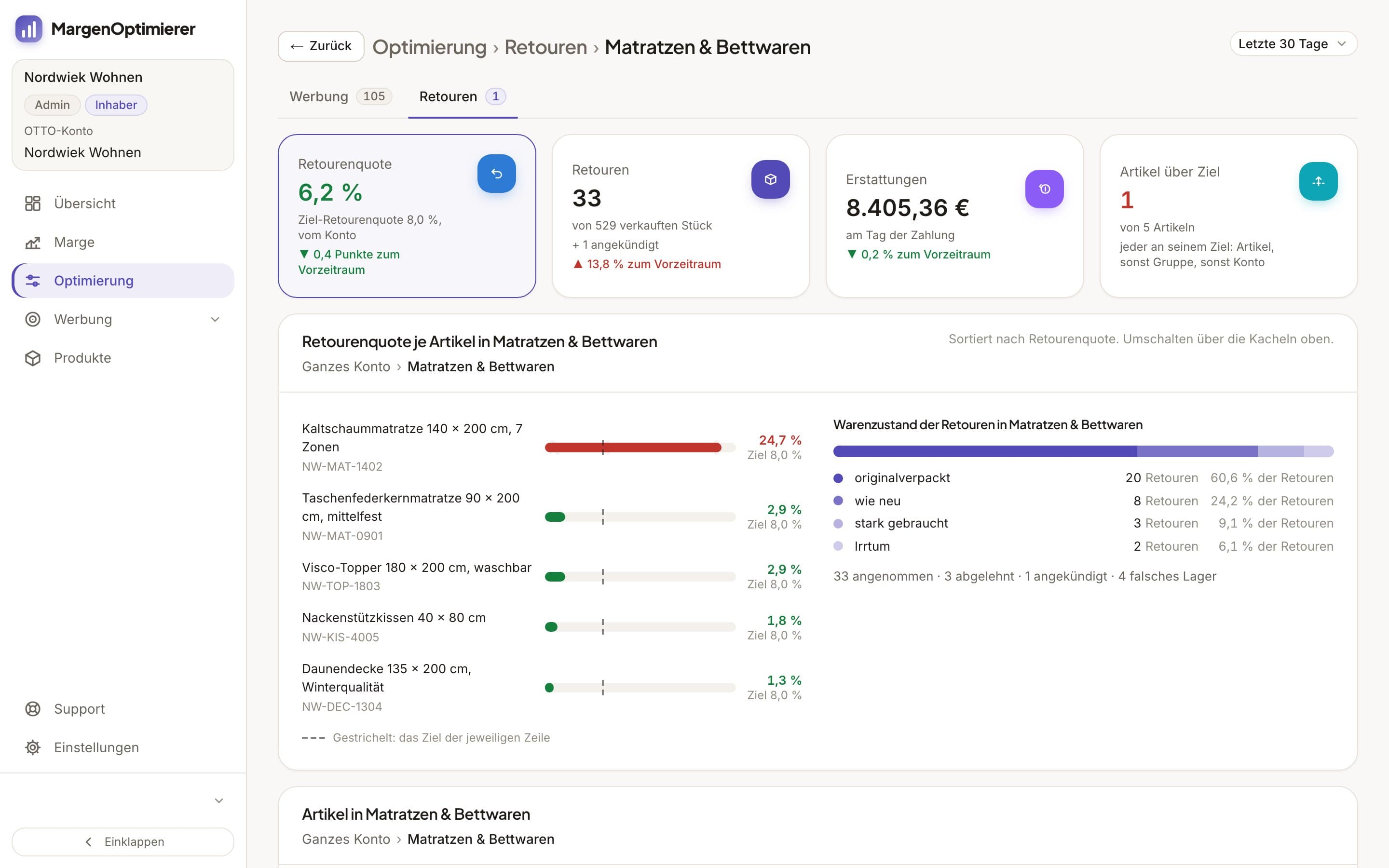
On the Marge (Margin) page, each item's refunds come off its revenue as a separate line. The OTTO commission OTTO gives back for a return is credited by the page on the day of the refund. MargenOptimierer doesn't calculate return shipping and warehouse handling, because they aren't at OTTO. OTTO doesn't pass the reason your customer picks at registration to MargenOptimierer, so for that the „Retourengründe“ tab in the partner portal remains.
MargenOptimierer costs from 49 € net per month. You can test the first 14 days for free, no credit card needed.
Frequently asked questions
Does OTTO have a returns report like Amazon?
You'll find a report on all returns like Amazon's Customer Returns Report at OTTO under „Analysen“ → „Logistik“ → „Logistik Details“, in the „Kundenretouren“ sub-tab. It shows the status and reason of each return and downloads as a CSV file. OTTO has no report on the cost of your returns.
Why can't I see a registered return in the order overview?
A return only appears in the order overview once it's been accepted or rejected. Before that you'll find it under „Logistik Details“ in the „Kundenretouren“ sub-tab, with the status „Angekündigt“ or „Unterwegs zu Ihnen“. OTTO updates this data once a day.
Do I have 2 working days or 48 hours to process a return?
It's 2 working days from the working day after delivery. That's what the Helpdesk says, and that's how OTTO measures your punctuality under „SLA & Verstöße“. An English OTTO guide gives 48 hours, which is less time over a weekend. For freight goods it's 7 working days from collection.
Does OTTO tell me why my customer is sending something back?
Yes. OTTO shows the reason your customer picks at registration under „Logistik Details“ in the sub-tabs „Kundenretouren“ and „Retourengründe“. It doesn't appear in the order overview.
Keanu Dutado
Keanu Dutado sells on OTTO and other marketplaces with his own company and runs the ads himself. He has several years of e-commerce experience and was an Amazon Ads Manager at Snocksulting / Remazing Nova. He founded MargenOptimierer.
Last updated and sources
Last updated: 31 October 2026
- OTTO Partner Connect (partner portal, login required), as of 28 October 2026
- Retoure erhalten (Partner Helpdesk, login required), as of 29 April 2026
- Retourendetails-Analysen (Partner Helpdesk, login required), as of 25 September 2025
- Retourenquote-Analysen (Partner Helpdesk, login required), as of 4 September 2026
- Verspätete Retourenbearbeitung (Paketlogistik) Analysen (Partner Helpdesk, login required), as of 14 November 2025
- Retourenprozess bei Speditionsware (Partner Helpdesk, login required), as of 14 November 2025
- Erstattungsbeleg (Partner Helpdesk, login required), as of 12 April 2024
- Nachfrage- und Umsatz-Analysen (Partner Helpdesk, login required), as of 19 August 2026
- Vorgehen bei den Auszahlungen (Partner Helpdesk, login required), as of 13 August 2026
- Abrechnung der Marktplatzgebühren (Partner Helpdesk, login required), as of 9 September 2026
- OTTO Payments, Paymentgebühr (Partner Helpdesk, login required), as of 10 July 2026
- Abrechnungen und Berichte (Partner Helpdesk, login required), as of 23 January 2026
- OTTO Onboarding-Guide, englisch, as of 16 February 2026
Next
- How do I reduce my return rate on OTTO?
- How do I calculate my profit per item on OTTO?
- What does it cost to sell on OTTO?