How do I calculate my profit per item on OTTO?

By Keanu Dutado · Last updated: 5 November 2026
In short
Your profit per item on OTTO is what your customer pays for the item and shipping, without VAT, minus OTTO commission and minus 16% OTTO commission on the shipping costs. Your own costs, ad spend and the cost of your returns come off that. The OTTO base fee of 99.90 € a month belongs to your account and not to any one item. OTTO doesn't show you a profit per item, you put it together yourself from several invoices and reports.
OTTO commission and ad spend arrive on separate invoices. If you work out an item's profit from them, it's easy to use the wrong rate or forget a line. Then an item looks better than it is.
How OTTO calculates its commission
OTTO calculates the OTTO commission on the selling price including VAT. The rate depends on your item's commission group and lies between 7% and 22%.
Some commission groups use a tiered commission, where each price band has its own rate. For furniture it's 19% up to 150 €, 18% from 150 to 500 € and 17% above 500 €, with each upper limit included. OTTO's own example is a piece of furniture at 2,000 €. That's 150 € × 19% plus 350 € × 18% plus 1,500 € × 17%, a total of 346.50 €.
Every rate already includes the payment fee of 2.7%. OTTO still invoices it separately. The payment fee comes as its own invoice from OTTO Payments GmbH, and the marketplace fees invoice shows the commission without it. If you calculate with the full rate, don't deduct the payment fee a second time. For the garden table in the worked example below, that's 64.32 € of OTTO commission at the full rate. Of that, 9.42 € of payment fee appears on its own invoice and 54.90 € on the marketplace fees invoice.
The calculated OTTO commission is a net amount, and OTTO adds VAT to it. If you can reclaim input VAT, this VAT is not a cost for you and you calculate with the net amount.
If your company has a confirmed climate target under the Science Based Targets initiative, OTTO lowers the rate by 1 percentage point on proof. For electronics, large appliances, game consoles and „Kleineisen“ (small hardware) it's 0.5 percentage points.
Garden furniture is not its own commission group on OTTO
OTTO has no „Gartenmöbel“ (garden furniture) commission group. A garden table falls under Möbel (furniture) with the tiered commission of 19% to 17%. A garden swing seat falls under Garten (garden) at 15% on the whole price. Seat cushions fall under Wohntextilien (home textiles), also at 15%.
You can see your item's commission group in the partner portal under „Analysen“ (Analytics) → „Berichte“ (Reports) → „Produktdaten“ (Product data), per SKU in the „Sortimentsgruppe“ (assortment group) column. OTTO lists the rate of every commission group in its assortment overview (Sortimentsübersicht) on otto.market.
OTTO takes 16% on shipping costs
If your customer pays shipping costs, OTTO takes its own OTTO commission on them. OTTO calculates 16% on the shipping costs as your customer pays them, meaning including VAT. VAT is added on top of this commission again. At 29.90 € for freight delivery that's 4.78 €.
The OTTO base fee belongs to your account
OTTO charges you 99.90 € a month plus VAT, however many items you offer. The invoice arrives on the first of the month for the previous month.
In practice there are two ways to handle it. Many sellers spread the OTTO base fee across the units sold. Others treat it as a fixed cost and calculate profit per item without it. Both are common.
Ad spend is on its own OTTO invoice
OTTO bills Sponsored Product Ads once a month on a separate invoice, on the 2nd for the previous month. You'll find it under „Finanzen“ (Finance) → „Servicegebühren“ (Service fees), and it's settled through OTTO Payments. The invoice shows the ad spend for the whole month including VAT.
Ad spend per item is under „Marketing“ → „Sponsored Product Ads“ in the „Artikel-Report“ (Item report) tab. OTTO counts as ad revenue any purchase up to 14 days after a click on an ad, including VAT, and by default also purchases of other items of your brand.
In practice ads are missing from many calculations, because they sit in this separate report.
What a return on OTTO costs
If you accept a return, OTTO refunds you the original OTTO commission on the item with an invoice correction. OTTO doesn't say whether that includes the 16% on shipping costs. According to OTTO you get the payment fee back in full or in part on a separate invoice for returns, and OTTO doesn't say which case applies when. If you instead refund your customer only part of the price and they keep the goods, OTTO keeps the OTTO commission and payment fee in full.
Your customer only gets shipping costs back if they return all items of the order. You don't get back your own shipping to the customer, the packaging or the ads.
For goods sent by freight, you're obliged toward OTTO to pick the goods up from the customer free of charge. You tell them the pickup date within 24 hours. So you pay for the pickup yourself.
In practice furniture that has been assembled and taken apart again usually can't be sold as new. It goes as B-stock or gets disposed of. Many sellers therefore offer a partial refund of around 20% and avoid the return that way. OTTO keeps the OTTO commission and payment fee in full in that case.
Many sellers only count the refund on a return. Return shipping and handling in the warehouse are then missing from the calculation.
The margin at which an item pays off on OTTO
What's left after all costs per sale is called contribution margin. Margin is this amount as a percentage of revenue. You decide yourself at what margin an item pays off for you. There's no number that holds for everyone. How much advertising an item can afford at the margin you want is covered in What is a good ACoS on OTTO, and how do I calculate it?
How to calculate with OTTO's reports today
There's no ready-made view of profit per item in the partner portal OTTO Partner Connect. OTTO's Helpdesk says that OTTO can't provide any further reports. So the shortest route is through Excel.
- Open „Analysen“ → „Berichte“ → „Produktdaten“ and download the list. The „Sortimentsgruppe“ column names the commission group per SKU.
- Open „Finanzen“ → „Marktplatzgebühren“ (Marketplace fees). Every Wednesday OTTO issues a „Rechnung“ (invoice) there and a „Rechnungskorrektur“ (invoice correction) for the returns, and a closing invoice on the first of the month. Download all of them for the month as CSV.
- Copy the files one below the other. Each row names the SKU, the item value including VAT and, per price band, the base, rate and amount. Add up item value, commission and quantity per SKU, with invoice corrections as negatives. This commission is already reduced by the payment fee.
- Open „Finanzen“ → „Paymentgebühren“ (Payment fees) and download the invoices for orders and for returns. Add the payment fee to the commission. Only the two together give the rate from the assortment overview.
- Under „Aufträge“ (Orders) → „Auftragsübersicht“ (Order overview), download your orders. Calculate 16% on the shipping costs your customers paid.
- Open „Marketing“ → „Sponsored Product Ads“ and download the „Artikel-Report“ for the same period as CSV. It holds the ad spend per item.
- You'll find refunds to your customers under „Aufträge“ → „Kundenbelege“ (Customer documents).
- Enter in your own columns what purchase price, shipping and packaging cost you per unit, and what returns have cost you.
- For each SKU, take revenue including shipping costs without VAT, minus commission with payment fee, commission on shipping costs, ad spend, refunds without VAT, your own costs times quantity and return costs. Deduct the OTTO base fee at the end from the whole account, or spread it.
The report under „Analysen“ → „Controlling“ doesn't help here. It's missing the commission on shipping costs, the payment fee and the OTTO base fee, and it assigns fees to the shipping date. For one month that's a good ten downloads, plus an invoice correction every week.
A garden table at 349 € on OTTO
Say you sell an acacia garden table for 349 €, and your customer pays 29.90 € for freight delivery. The table falls under the Möbel (furniture) commission group on OTTO. Purchase price, freight, packaging and ad spend are example values.
| Revenue including VAT (349.00 € plus 29.90 €) | 378.90 € |
| VAT 19% | −60.50 € |
| OTTO commission 19% on the first 150 € | −28.50 € |
| OTTO commission 18% on the remaining 199 € | −35.82 € |
| OTTO commission 16% on 29.90 € shipping costs | −4.78 € |
| Purchase price (example) | −120.00 € |
| Freight to the customer (example) | −45.00 € |
| Packaging (example) | −3.00 € |
| Ad spend for this sale (example) | −25.00 € |
| Profit per unit (contribution margin) | 56.30 € |
Margin=56.30 €÷378.90 €=14.9%
The OTTO commission on the table is 64.32 €, which is 18.4% of the price. If you calculate 19% on the whole price, you get 66.31 €, which is 1.99 € too much. The payment fee of 9.42 € is already part of the 64.32 €.
On the 64.32 €, OTTO charges another 12.22 € of VAT, which you reclaim as input VAT.
If you spread the OTTO base fee over 40 sales a month, you keep 2.50 € less per table. If the table comes back, OTTO refunds you the 54.90 € on the marketplace fees invoice. The 9.42 € payment fee comes back in full or in part. OTTO doesn't say whether the 4.78 € on the shipping costs comes back. The 45 € freight, the packaging and the ad spend remain, and the pickup from the customer comes on top.
You can run this with your own numbers in the contribution margin and profit calculator, with every OTTO commission group.
How to see your profit per item in MargenOptimierer
MargenOptimierer does this calculation for every item in your OTTO account. The Marge (Margin) page shows what's left of your revenue after VAT, OTTO commission, ad spend, refunds and your own costs. You see it for your whole account, for each product group and for each item.
MargenOptimierer calculates the OTTO commission per item with the rate of its commission group from OTTO's assortment overview. The tiers per price band and the commission on shipping costs are included. MargenOptimierer deducts the payment fee only once. If OTTO doesn't name a clear rate for an item, MargenOptimierer uses the usual rate of its commission group and marks the item with Standardsatz (standard rate).
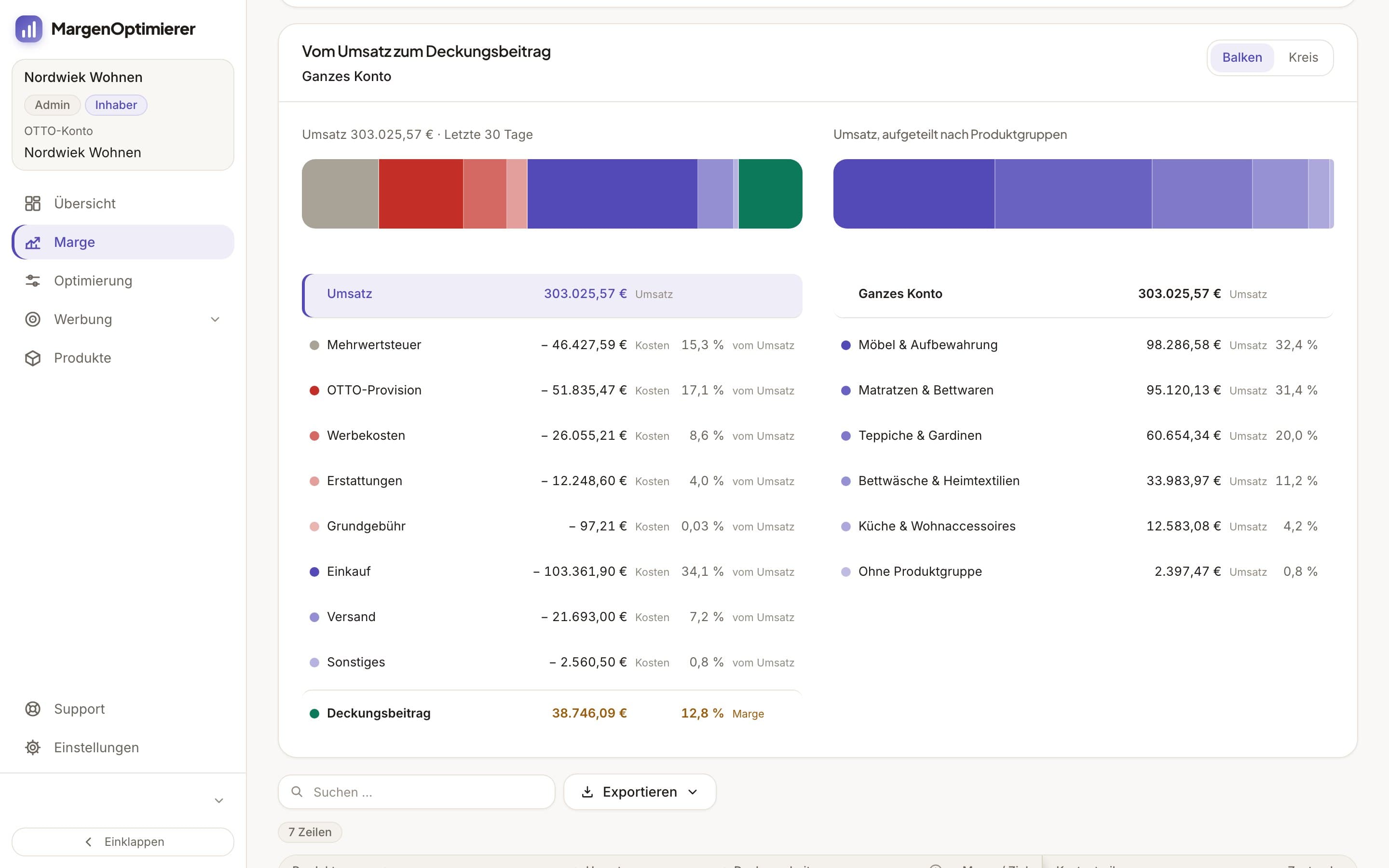
You enter your own costs per item on the Produkte (Products) page. If a purchase price changes, the new one applies from the day you choose. Ad spend that OTTO doesn't assign to any item isn't spread by MargenOptimierer. It sits with the OTTO base fee in the Ohne Artikel (No item) row of your account.
You set a target margin for your account, and a product group or item can have its own. If an item is below its target, its margin appears in orange and it shows up under cost drivers. In the negative, it appears in red.
On a return, MargenOptimierer deducts the refund and credits back the OTTO commission and the VAT in it.
MargenOptimierer costs from 49 € net per month. You can test the first 14 days for free, no credit card needed.
Frequently asked questions
Does OTTO have a profit calculator like Amazon?
No. OTTO has no official calculator for commission and profit, and the partner portal shows no profit per item. The rates are in OTTO's assortment overview, and you have to do the math yourself.
Do I get the OTTO commission back on a return?
Yes. If you accept a return, OTTO refunds you the OTTO commission on the item with an invoice correction, and the payment fee in full or in part. OTTO doesn't say whether the 16% on shipping costs comes back too. If you refund only part of the price and the customer keeps the goods, OTTO keeps the OTTO commission and payment fee in full.
Is the OTTO commission net or gross?
OTTO applies the rate to the selling price including VAT. The OTTO commission itself is a net amount, to which OTTO adds VAT. If you can reclaim input VAT, you calculate with the net amount.
Keanu Dutado
Keanu Dutado sells on OTTO and other marketplaces with his own company and runs the ads himself. He has several years of e-commerce experience and was an Amazon Ads Manager at Snocksulting / Remazing Nova. He founded MargenOptimierer.
Last updated and sources
Last updated: 5 November 2026
- Sortimentsübersicht mit Provisionen, as of 28 October 2026
- Abrechnung bei OTTO Market, as of 28 October 2026
- Provision & Gebühren (Partner Helpdesk, login required), as of 20 October 2026
- Staffelprovision für Marktplatzgebühren ab Oktober 2024 (Partner Helpdesk, login required), as of 28 October 2026
- Abrechnung der Marktplatzgebühren (Partner Helpdesk, login required), as of 9 September 2026
- Abrechnungen und Berichte (Partner Helpdesk, login required), as of 28 October 2026
- Analyse zu den Marktplatzgebühren (Partner Helpdesk, login required), as of 10 May 2024
- OTTO Payments, Paymentgebühr (Partner Helpdesk, login required), as of 10 July 2026
- Sponsored Product Ads: Kosten & Abrechnung (Partner Helpdesk, login required), as of 13 August 2026
- Sponsored Product Ads: Reporting (Partner Helpdesk, login required), as of 13 July 2026
- Retourenprozess bei Speditionsware (Partner Helpdesk, login required), as of 14 November 2025
Next
- What does it cost to sell on OTTO?
- What is a good ACoS on OTTO, and how do I calculate it?
- How do I read the margin?