When should I lower or raise bids on OTTO?

By Keanu Dutado · Last updated: 31 October 2026
In short
On OTTO, you lower a bid, the maximum you'll pay for a click, when its ACoS is above your target ACoS. ACoS is your ad spend as a share of the revenue the ad brought in. If it's well below your target, you can raise the bid, and you have to judge each bid on its own, per item and per keyword. After a change, experienced sellers wait 7 to 14 days, because OTTO adds purchases up to 14 days after the click.
OTTO shows you an ACoS per campaign, but not which bid is pushing it up. If you only look at the campaign, you keep expensive targetings running or switch off a campaign in which most targetings earn well. And if you judge too soon after a change, you lower bids whose sales OTTO hasn't counted yet.
No target, no verdict
Only your target ACoS tells you whether an ACoS is too high. Roughly, you work it out like this. From the gross price, subtract all costs of a sale except advertising, and the rest as a share of the price is your break-even ACoS. From that, subtract the margin you want to keep. If 35 € of a 100 € price is left before advertising and you want to keep a 10% margin, your target is 25%. Good ACoS and target ACoS on OTTO goes into more detail.
How OTTO's auction sets the click price
With every page view on otto.de, an auction for the ad placements takes place. According to OTTO's guide to Sponsored Product Ads, it's a second-price auction. So you don't pay your bid, you pay the price it took to win. OTTO bills at the „letztendlich erreichten CPC“ (final CPC reached), which is at most your bid. What you paid per click on average is called CPC.
Besides the bid, click probability counts. OTTO estimates it per customer from price, shipping costs, delivery time and product data, provided the customer has agreed to the use of their data for marketing. Otherwise the second-price auction alone decides. An item with a good offer can therefore win with a lower bid than one with a weak offer.
Only an item for which you hold the BuyBox may bid, meaning OTTO offers your listing for purchase on the product page. Without the BuyBox, OTTO doesn't show the ad, so it gets no clicks and costs nothing. A higher bid changes nothing about that. According to OTTO, the minimum bid is currently 0.20 €, in a manual campaign also per keyword.
Where a bid sits on OTTO
On OTTO, a bid applies per targeting, so per item or per keyword. In an automatic campaign you set one bid per item, and OTTO chooses the searches. In a manual campaign you set one bid per keyword and item. OTTO's documentation doesn't mention a premium for specific placements, like the one Amazon has for the top of search.
OTTO's „Intelligentes Bieten“ (smart bidding) exists only in automatic campaigns. You tick „CPC-Gebote automatisch optimieren“ (optimize CPC bids automatically) and set a „Max. CPC“ that OTTO won't exceed. OTTO then adjusts the bids daily, based on the numbers of the last 7 days. OTTO doesn't say whether this can also go below your previous bid.
What OTTO recommends as a bid
When you create a campaign, OTTO shows a „CPC-Empfehlung“ (CPC recommendation) per item. According to the guide, it's based on winning bids for similar items from the last 7 days. According to OTTO, it wins you about half of all auctions. The „Kampagnen-Report“ (campaign report) and „Artikel-Report“ (item report) also show an „Empfohlenes Gebotsintervall“ (recommended bid range). For the range in the „Prognose-Report“ (forecast report), OTTO's glossary explains that it runs from the bid below which 15% of winning bids for similar items lay, up to the one below which 90% lay. OTTO doesn't say whether the reports calculate their range the same way.
The recommendation tells you what wins auctions. It doesn't tell you whether a bid pays off for you. Only your target does.
When OTTO advises lowering and raising
OTTO's guide works with ROAS. It's the same calculation as ACoS, only the other way round, ad revenue divided by ad spend. OTTO writes it as a percentage, and a ROAS of 400% equals a 25% ACoS. So a ROAS above target is an ACoS below target. OTTO calls ACoS „KUR (ACoS)“.
The guide holds a campaign's ROAS against your target and also checks whether it spends its budget, the amount it's allowed to spend.
| Situation | What OTTO recommends |
|---|---|
| ROAS well above target | Raise the bid |
| Budget not fully spent | Raise the bid slightly |
| ROAS below target, budget fully spent | Lower the bid |
| ROAS well below target | Take weak items out of the campaign |
The guide names fixed percentages only in worked examples, not as a rule. OTTO doesn't put a number on “well” either. You set the distance yourself, for example as a share of your target, and only raise once ACoS is that far below. The narrower you set it, the more often you'll raise bids that then slip above target.
A higher bid can bring you more auctions and more clicks. Nobody can promise that, because competitors and click probability have a say as well.
Each targeting on its own
OTTO's matrix looks at the campaign. Lowering and raising, however, happen per targeting. In practice, three or four targetings often spoil a campaign's average while the rest runs well. If you then switch off the whole campaign, you lose the good ones too. So judge each targeting and each search term on its own. Many sellers, by contrast, let their campaigns run with no upkeep at all.
Measure the ACoS of the advertised item when you do. In a campaign's detail report, OTTO counts the purchases of your whole brand after a click by default. That makes a targeting look better than it's really doing for the advertised item.
OTTO gives a rule of thumb of 50 € of ad spend per item before you draw first conclusions. OTTO doesn't name a fixed number of clicks at which a targeting without a sale should be lowered.
How long to wait after a change on OTTO
OTTO credits a click with all purchases that follow up to 14 days later. Measured on a real OTTO account, a day's ad revenue is still growing at least 12 days later, while ad spend stays the same. The 14 days OTTO names apply. So the ACoS of the last 14 days isn't final yet and can still fall.
OTTO doesn't name a waiting time after a bid change. In practice, you look at a targeting with many clicks again after 7 days. With few clicks, for example in a small niche, 14 days are usual. OTTO's CPC recommendation and smart bidding use 7 days, incidentally, even though purchases are attributed for up to 14 days.
How to check and change your bids in the partner portal today
You steer your advertising in OTTO Partner Connect, the partner portal for sellers.
- Open „Marketing“ → „Sponsored Product Ads“. In the „Dashboard“ tab, use „Spalten ein-/ausblenden“ (show/hide columns) to add „Ausgaben“ (Spend), „CPC“, „KUR (ACoS)“ and „Budget“ per campaign.
- The „Kampagnen-Report“ tab shows for each campaign the „Aktuelle Gebotsintervall“ (current bid range), the „Empfohlene Gebotsintervall“ and the „Erfüllungsgrad“ (fulfillment level), meaning how much of the budget is spent.
- In the „Artikel-Report“ tab, expand a campaign down to the SKU. „CPC“, „Empfohlenes Gebotsintervall“ and „KUR“ sit side by side per item.
- For keywords, open a campaign's detail report with the icon on the campaign, and there the „Keyword Report“. At the top, switch the „Conversion-Basis“ (conversion basis) from „1. Marke“ (1. Brand) to „4. Artikel“ (4. Item).
- To make changes, click the „Bearbeiten“ (Edit) icon in the campaign's row in the „Dashboard“. In an automatic campaign, the step „2 Produktauswahl“ (2 Product selection) shows „CPC-Empfehlung“ and „CPC-Gebot“ (CPC bid) per item. In a manual campaign, the bids per keyword are in the step „3 Keywords & Gebote festlegen“ (3 Set keywords and bids).
You have to do the math yourself. Divide spend by revenue per targeting, write your target next to it and mark what's above. The numbers of the last 14 days can still rise. You work out budget usage in the Dashboard from spend and budget, and the gap between bid and paid CPC from your bid and the „CPC“ column. Then you look up every targeting you want to change in the wizard. You repeat that per campaign and every one or two weeks.
Two keywords in an OTTO campaign with a 25% target ACoS
Say your manual campaign “Manual – Garden furniture” advertises the oak table with the keyword „gartentisch eiche“ and the acacia chair with the keyword „gartenstuhl holz“. Your garden furniture has a target ACoS of 25%. All numbers are an example, measured on the advertised item and from days more than 14 days back.
| „gartentisch eiche“ | „gartenstuhl holz“ | both together | |
|---|---|---|---|
| Bid | 0.50 € | 0.40 € | |
| Clicks | 680 | 200 | 880 |
| Ad spend | 340 € | 50 € | 390 € |
| average paid per click | 0.50 € | 0.25 € | |
| Sales through the ad | 10 tables | 5 chairs | |
| Ad revenue | 1,000 € | 595 € | 1,595 € |
| ACoS | 34% | 8% | 24% |
| allowed at 25% | 250 € | 149 € |
Added together, the two keywords are just under target at 24%, and at campaign level there'd be nothing to do.
„gartentisch eiche“ is 90 € over target with 340 € of ad spend. Each table costs 34 € in advertising, and 25 € would be allowed. Here you're paying on average as much as your entire bid, and you never pay more. At the same sales per click, a click could cost only 250 € ÷ 680 clicks on average, so around 0.37 €. How far you lower the bid in one step is up to you, as OTTO doesn't set a step. You could set it straight to 0.37 €. Here you lower it by 20% to 0.40 € and check after 7 to 14 days whether ACoS has fallen below 25%. If it's still above, you lower it further.
„gartenstuhl holz“ is far below target at 8%, and 149 € would be allowed instead of 50 €. On average you pay 0.25 € per click even though you bid 0.40 €, which is how the second-price auction works. You raise the bid, for example by 10% to 0.44 €, and check whether more clicks come in and ACoS stays below target.
How to lower and raise your OTTO bids with MargenOptimierer
MargenOptimierer fetches your campaigns and ad numbers from OTTO and measures each targeting against its own target ACoS, calculated on the revenue of the advertised item. The table from the worked example is ready for every targeting, for the period you choose.
On the Optimierung (Optimization) page, your targetings sit in the Werbung (Advertising) tab in four rows, even if one of them is empty. In „Zu teuer“ (Too expensive), ACoS is above target. In „Klicks ohne Verkauf“ (Clicks without a sale), there was neither ad revenue nor an order. In „Läuft gut“ (Doing well), ACoS is well below target, by default below 80% of it, so below 20% with a 25% target ACoS. In „Kaum gesehen“ (Barely seen), OTTO rarely shows the ad. Each row says how it calculates, with the values that currently apply.
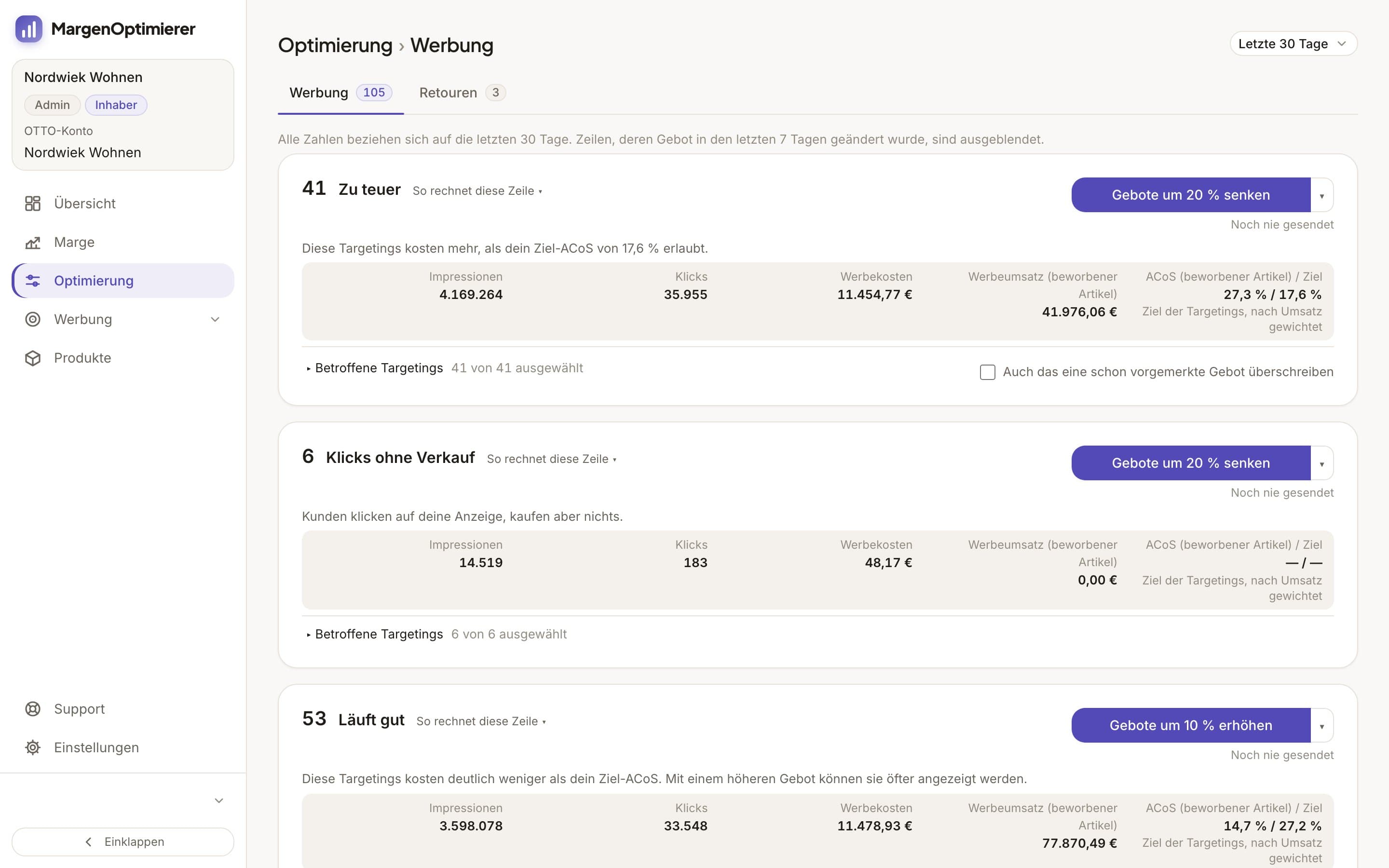
Each row has a button that changes all selected bids by the same percentage. By default it's set to 20% for lowering and 10% for raising, for example Gebote um 20 % senken (Lower bids by 20%), and the arrow on the button lets you choose another percentage. You see the new bid next to each bid beforehand. One click queues the new bids, meaning MargenOptimierer sets them aside as a change. You then choose Jetzt an OTTO senden (Send to OTTO now) or Erst in den Changelog (Changelog first), the list of your queued changes from which you send them later. A bid only goes to OTTO after your click, and none falls below OTTO's minimum bid.
The waiting time after a change is built in. Once you've sent the bid of a targeting, MargenOptimierer doesn't offer it for lowering or raising again during a rest period, by default 7 days. That way you see the numbers of the new bid before changing it again. By default a targeting is only judged from 10 clicks in the period. The rest period, the minimum clicks and the 80% are defaults of MargenOptimierer, not OTTO's rules, and you change them under Einstellungen (Settings) in the Vorgaben (Defaults) tab. If OTTO's ad numbers are missing for a day in the period, no row queues bids, and the sentence in its place names the day from which the period is complete.
If you'd rather think in ROAS like OTTO's guide, set your advertising target as a target ROAS. You can also change individual bids in the Werbekonsole (ad console) directly in the table, next to their numbers.
MargenOptimierer costs from 49 € net per month. You can test the first 14 days for free, no credit card needed.
Frequently asked questions
Do I always pay my full bid on OTTO?
No. According to its guide, OTTO auctions the placements in a second-price auction and bills the click price it took to win. Your bid is the upper limit. The „CPC“ column shows what you pay on average.
What is the minimum bid on OTTO?
According to OTTO, currently 0.20 € per click. In a manual campaign this also applies to each keyword.
Does OTTO have dynamic bids like Amazon?
Yes, OTTO calls it „Intelligentes Bieten“ (smart bidding), and it exists only in automatic campaigns. OTTO adjusts the bids daily based on the last 7 days, at most up to the „Max. CPC“ you set. OTTO's documentation doesn't mention a premium for specific placements as on Amazon.
How long should I wait after a bid change on OTTO?
OTTO doesn't name a waiting time. Because OTTO adds purchases up to 14 days after the click, many sellers look at a targeting again after 7 to 14 days. With many clicks 7 days are enough, with few it's more like 14.
Keanu Dutado
Keanu Dutado sells on OTTO and other marketplaces with his own company and runs the ads himself. He has several years of e-commerce experience and was an Amazon Ads Manager at Snocksulting / Remazing Nova. He founded MargenOptimierer.
Last updated and sources
Last updated: 31 October 2026
- OTTO Advertising: SPA-Leitfaden (PDF), as of 28 October 2026
- OTTO Advertising: Sponsored Product Ads, as of 28 October 2026
- Sponsored Product Ads, Allgemeine Informationen (Partner Helpdesk, login required), as of 28 October 2026
- Sponsored Product Ads, Kriterien zur Ausspielung (Partner Helpdesk, login required), as of 28 October 2026
- Sponsored Product Ads, Kosten und Abrechnung (Partner Helpdesk, login required), as of 28 October 2026
- Sponsored Product Ads, Buchung und Erstellung von Kampagnen (Partner Helpdesk, login required), as of 28 October 2026
- Sponsored Product Ads, Reporting (Partner Helpdesk, login required), as of 28 October 2026
- Analyse und Optimierung von SPA-Kampagnen (Partner Helpdesk, login required), as of 28 October 2026
Next
- How do Sponsored Product Ads work on OTTO?
- Which metrics matter for OTTO advertising?