Should I use automatic or keyword campaigns on OTTO?

By Keanu Dutado · Last updated: 5 November 2026
In short
In an automatic campaign, OTTO uses your offer to choose which searches your item appears for, and shows it in search results, in product lists and on product detail pages. In a manual campaign, you book keywords yourself, meaning the words your item should appear for, and it runs in search results only. OTTO recommends starting with an automatic campaign and adding a manual one as soon as you know which words customers buy from you with. The two complement each other, because only the automatic campaign reaches product lists and product detail pages.
Since OTTO announced bidding on your own keywords in August 2025, sellers have been asking whether the automatic campaign is still needed. If you switch it off and advertise only with a manual campaign, you lose the ad placements in product lists and on product detail pages. If you advertise only with an automatic campaign, you can't bid higher on a search term that sells well.
What an automatic campaign does on OTTO
In an automatic campaign, OTTO chooses the search terms itself, based on your product information. OTTO doesn't describe exactly which rules it uses. The ads appear in search results, in product lists and on product detail pages. You set a bid per item, the most you'll pay for a click.
OTTO's „Intelligentes Bieten“ (smart bidding) exists only in automatic campaigns. If you tick „CPC-Gebote automatisch optimieren“ (optimize CPC bids automatically) there, OTTO adjusts your bid daily, based on the data of the last 7 days and at most up to the amount you set.
OTTO derives the searches from your offer. So the campaign only runs as well as your offer contains the words customers search for. In practice, many sellers just describe the product and leave out the searched words.
What a manual campaign does on OTTO
In a manual campaign, you book keywords per item, each with its own match type and its own bid. The ads appear in search results only. On OTTO the minimum bid is 0.20 €, per item as well as per keyword.
You decide whether a campaign is automatic or manual when you create it. OTTO doesn't let you change that afterwards. If you want to switch, you create a new campaign.
The three match types on OTTO
The match type sets how closely a customer's search has to fit your keyword. In the partner portal the three are called „Exact Match“, „Phrase Match“ and „Broad Match“. Exact is the default.
| Match type on OTTO | What fits according to OTTO | Example for the keyword „gartenstuhl holz“ |
|---|---|---|
| Exact | exactly this keyword, without plural and without variants | only „gartenstuhl holz“ |
| Phrase | the words in this order, other words may come before or after, plural is included | also „klappbarer gartenstuhl holz“ |
| Broad | the words in any order, also related terms, plural and variants | also „holz gartenstühle“ |
If you're coming from Amazon, Exact needs a rethink. On Amazon, exact match includes the plural, on OTTO it doesn't. If you want to book „gartenstuhl holz“ and „gartenstühle holz“ as exact, those are two keywords on OTTO.
On OTTO, you can only exclude in the automatic campaign
Negative keywords are search terms for which OTTO shouldn't show your ad. In its advertising guide, OTTO names the match types Exact and Phrase for them. Negative keywords always attach to a single item. If you want to exclude a search term for a whole campaign, you enter it on each of its items, according to the Helpdesk also all at once with a CSV file.
OTTO doesn't accept negative keywords in a manual campaign. The guide leaves this open and recommends negative keywords “especially with automatic campaigns”. OTTO's interface, through which software changes campaigns, is clear. It rejects negative keywords in manual campaigns, and that's also what happened in a test in OTTO's test environment on 15 September 2026. In a manual campaign you therefore steer through the keyword itself, its match type and its bid.
What OTTO recommends for using both campaigns together
OTTO recommends the automatic campaign for your first campaign, for tests, for reach and for collecting keyword ideas. Once you know your keywords and want to steer them individually, OTTO recommends adding a manual campaign. For product lists and product detail pages, OTTO advises keeping the automatic campaign running.
OTTO's guide describes a cycle for this. You analyze the search terms of both campaigns and move the good ones as keywords into the manual campaign. You then exclude the same search terms as Exact in the automatic campaign.
In practice, some sellers keep good search terms in the automatic campaign anyway, even though excluding them is common on Amazon. Their reason is the ad placements. The automatic campaign also runs in product lists and on product detail pages, the manual one only in search results. If you exclude a search term in the automatic campaign, you may lose more than just that one search. OTTO doesn't describe the exact effect.
Neither approach is mandatory, and you decide based on your own numbers. If you exclude a good search term, compare impressions, clicks and revenue of the automatic campaign in the „Kampagnen-Report“ (campaign report) with the period before. Only analyze days more than 14 days back, because OTTO keeps crediting purchases to a click for that long. If the automatic campaign loses more revenue than the manual one gains with the search term, that speaks for keeping it.
Search terms that bring clicks but no sale get excluded from the automatic campaign by these sellers too. There you also lower or raise the bids of the items. In the manual campaign you move each targeting up or down individually. A targeting is what you place a bid on, so in a manual campaign each keyword on each item.
It has proven useful to create one automatic and one manual campaign for a single item or a group of similar items, instead of packing your whole range into one campaign. OTTO advises at least 5 items per campaign, and 15 to 20 at the start.
What's different on OTTO compared with Amazon
- In an automatic campaign on Amazon you can bid differently by type of search, for example for close and loose matches. OTTO doesn't have that, you set one bid per item.
- On Amazon you can bid on other sellers' products. OTTO doesn't describe that, and a campaign contains only your items and their keywords.
- Ad groups, Amazon's level between campaign and keyword, don't exist on OTTO. A keyword always attaches to an item.
How to see today which OTTO campaign runs automatically
- In the partner portal, open „Marketing“ → „Sponsored Product Ads“.
- Choose the „Kampagnen-Report“ tab.
- Scroll in the table to the „Kampagnenausrichtung“ (campaign targeting type) column. It shows „automatisch“ (automatic) or „manuell“ (manual) for each campaign, in the same row as „Ausgaben“ (Spend), „Umsatz“ (Revenue) and „KUR (Acos)“. That's OTTO's name for ACoS, your ad spend as a share of ad revenue.
OTTO doesn't show a total per campaign type. Download the table with „CSV Download“, add up the „Ausgaben“ and „Umsatz“ columns separately for automatic and manual, and divide spend by revenue for each. The „Dashboard“ tab has a „Gebote“ (Bids) column that can read „Manuell“ even for automatic campaigns. This column has nothing to do with the campaign type.
How to pull search terms from the automatic campaign today
- In the „Dashboard“ tab, open the automatic campaign's detail report with the „SPA Kampagnendetailreport“ (SPA campaign detail report) icon in its row, and then its „Keyword Report“ tab.
- The „Customer Search Term“ column shows the searches your ad appeared for. The „Keyword“ and „Match Type“ columns stay empty for an automatic campaign.
- Next to each search term are clicks, sales and „KUR (ACoS)“. Download the table with „CSV Download“ and mark the search terms with and without a sale.
For a manual campaign, the same report shows for each keyword which searches actually triggered it. That shows you how far a phrase or broad keyword reaches.
How to enter keywords and negative keywords today
You open an existing campaign under „Marketing“ → „Sponsored Product Ads“ in the „Dashboard“ tab with the „Bearbeiten“ (Edit) icon in its row.
- In a manual campaign there's the step „3 Keywords & Gebote festlegen“ (3 Set keywords and bids). There you enter keywords per item, separated by commas, tick „Exact Match“, „Phrase Match“ or „Broad Match“ and enter a bid per keyword from 0.20 €. With „CSV-Upload“ this also works with a file with the columns SKU, Keyword, Matchtype and bid.
- In an automatic campaign, the step „2 Produktauswahl“ (2 Product selection) has the section „Negative Keywords hinzufügen“ (Add negative keywords) below the items. There you enter the search terms per item, separated by commas. For many items at once, according to the Helpdesk this works with a CSV file, using „CSV-Upload“ above the table.
If you follow OTTO's cycle, you repeat this for every campaign and every period. OTTO doesn't describe an overview of which search terms are already booked as keywords and which are excluded in the automatic campaign. You keep that list yourself.
How to compare automatic and manual campaigns on OTTO
Say you advertise the 298 items of your garden furniture that are sellable on OTTO in two campaigns, “Automatic – Garden furniture” and “Manual – Garden furniture” with 25 keywords. Your garden furniture has a target ACoS of 25%. All numbers are an example for the last 30 days.
| Campaign | Ad spend | Ad revenue | ACoS |
|---|---|---|---|
| Automatic – Garden furniture | 600 € | 2,400 € | 25% |
| Manual – Garden furniture | 1,000 € | 4,000 € | 25% |
| both together | 1,600 € | 6,400 € | 25% |
Both campaigns are right on target. So comparing the totals speaks against neither of them. What you can do shows up one level deeper, in the Keyword Report of the automatic campaign.
| Search term in “Automatic – Garden furniture” | Clicks | Sales |
|---|---|---|
| „gartenstuhl klappbar“ | 40 | 3 |
| „gartenstuhl kinder“ | 30 | 0 |
You move „gartenstuhl klappbar“ as a keyword into “Manual – Garden furniture”, with match type Exact and, for example, a 0.40 € bid. Because a keyword on OTTO applies per item, it's created there on all 298 items. If you follow OTTO's guide, you also exclude „gartenstuhl klappbar“ as Exact in the automatic campaign, which makes 298 negative keywords, one per item. In the partner portal you enter them with a CSV file in one step. If you leave it there, it keeps running in both campaigns.
„gartenstuhl kinder“ has caused 12 € of ad spend and sold nothing. You exclude it in “Automatic – Garden furniture” as Exact on all 298 items, so with 298 negative keywords.
How to steer automatic and manual campaigns with MargenOptimierer
In Kampagnen-Setup (Campaign setup) you choose a product group and a template and create an automatic and a manual campaign in one go. A product group brings similar items together, for example all garden furniture. The manual campaign gets its keywords from the group's keyword list, which you maintain once. The preview shows you each campaign with its items and keywords beforehand. The automatic campaign has a checkbox there. If you tick it, the keywords of the manual campaign are excluded in the automatic one, as OTTO's guide recommends. Without the tick they run in both campaigns. Because you've already checked new campaigns in the preview, they go straight to OTTO after you click Anlegen (Create).
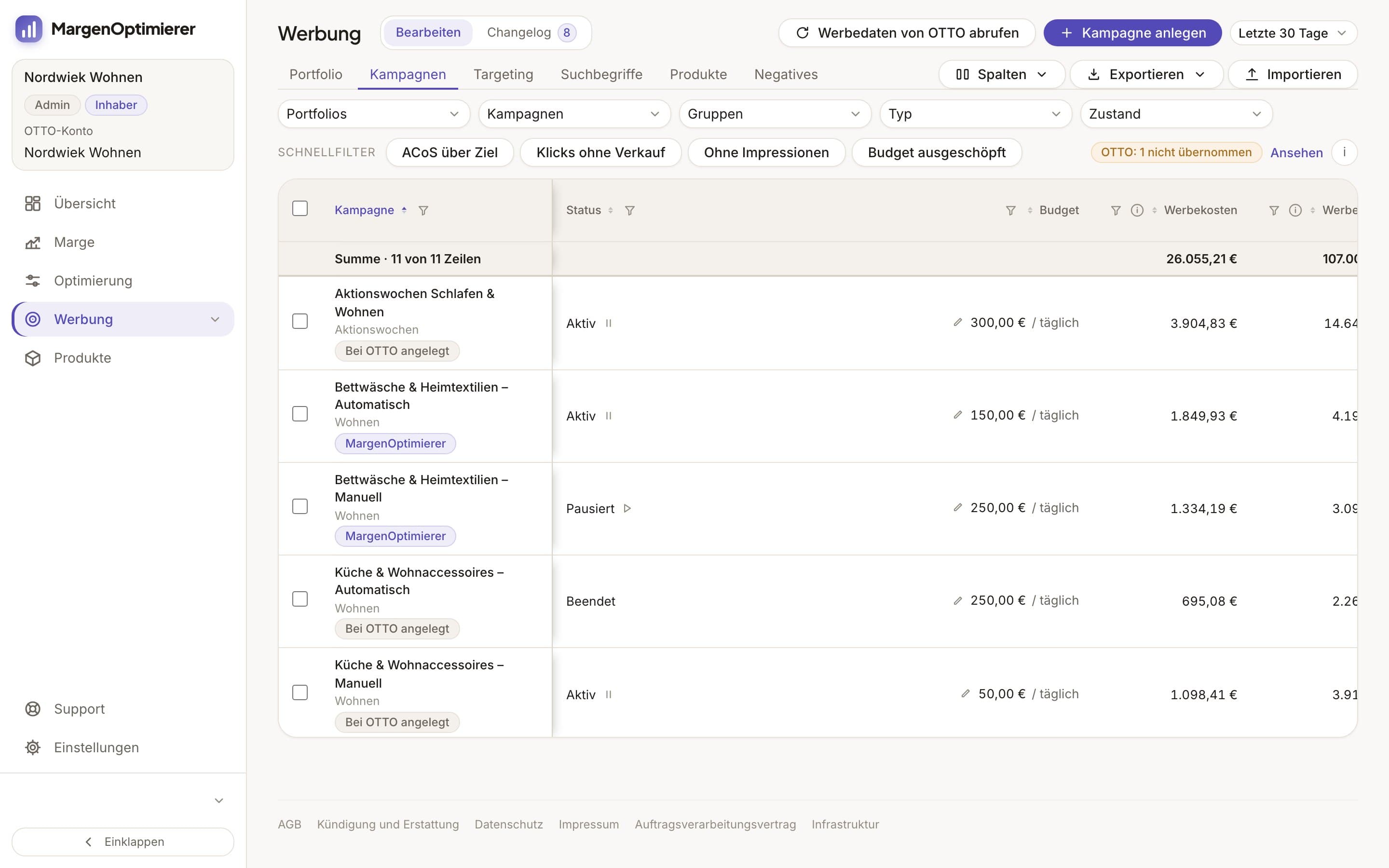
In the Werbekonsole (ad console), the Kampagnen (Campaigns) tab shows in the „Typ“ (Type) column whether each campaign is automatic or manual, and you can filter by it. The same row shows its ad spend, its ad revenue and its ACoS next to the target ACoS.
The Suchbegriffe (Search terms) tab shows the searches from your campaigns with their clicks, ad spend and sales. You move a search term that sells into a manual campaign with Als Keyword übernehmen (Add as keyword), with match type and starting bid. You exclude a search term without a sale in its automatic campaign with Ausschließen (Exclude), on all the campaign's items at once if you like. These are changes to running campaigns. So you queue them first, see them together in the Changelog and then send them to OTTO.
You lower and raise the bids of both campaign types on the Optimierung (Optimization) page, each targeting against its own target ACoS. Nothing goes to OTTO without your click.
MargenOptimierer costs from 49 € net per month. You can test the first 14 days for free, no credit card needed.
Frequently asked questions
Can I convert an automatic campaign on OTTO into a manual one?
No. You set the campaign type when you create the campaign, and after that it's grayed out in the partner portal. For a different campaign type you create a new campaign.
Does my manual campaign appear on OTTO's product detail pages?
No. A manual campaign on OTTO runs in search results only. Only ads from automatic campaigns appear in product lists and on product detail pages.
Does my item bid against itself if it's in both campaigns?
OTTO doesn't describe that. OTTO recommends combining both campaign types. In the partner portal, the negative keywords of the automatic campaign are said to avoid “conflicts with manual campaigns”. OTTO doesn't say which bid counts when the same item could come from both campaigns for the same search.
Which match type should I choose on OTTO?
OTTO sets Exact as the default. Exact fits only your exact keyword, without plural. Phrase and Broad reach more searches, including ones that fit your keyword less closely. You then see which searches a keyword really triggers in the campaign's „Keyword Report“.
Keanu Dutado
Keanu Dutado sells on OTTO and other marketplaces with his own company and runs the ads himself. He has several years of e-commerce experience and was an Amazon Ads Manager at Snocksulting / Remazing Nova. He founded MargenOptimierer.
Last updated and sources
Last updated: 5 November 2026
- OTTO Advertising: Sponsored Product Ads, as of 28 October 2026
- OTTO Advertising: SPA-Leitfaden (PDF), as of 28 October 2026
- OTTO: Pressemitteilung zum Keyword Targeting für Sponsored Product Ads, as of 28 October 2026
- Sponsored Product Ads, Buchung und Erstellung von Kampagnen (Partner Helpdesk, login required), as of 25 June 2026
- Sponsored Product Ads, Allgemeine Informationen (Partner Helpdesk, login required), as of 7 May 2026
- OTTO Market API: Sponsored Product Ads, as of 28 October 2026
- Amazon Ads: Targeting mit Sponsored Products, as of 28 October 2026
Next
- How do Sponsored Product Ads work on OTTO?
- How do I analyse search terms in OTTO's Keyword Report?
- When should I lower or raise bids on OTTO?
- OTTO SEO: How do I optimize listings for OTTO search?