What software is available for OTTO sellers?

By Keanu Dutado · Last updated: 7 November 2026
In short
There are many programs for connecting your shop to OTTO, but only a few for profit per item and ads. Well-known Amazon tools like Sellerboard or Helium 10 don't mention OTTO on their sites. The integration is handled by inventory management systems and integration service providers, programs that sync items, stock and orders between your shop and OTTO. Without a tool that covers OTTO, you work out profit and ads yourself from OTTO's reports.
Sellers coming from Amazon look for the same tool they use there and don't find it for OTTO. On OTTO the partner portal shows you revenue, fees and ad numbers, but no profit per item. Without software you're left with Excel, and that costs hours every month.
Three jobs, three kinds of software for OTTO
Software for OTTO sellers can be sorted by the job it does for you.
- Shop integration sends items, prices and stock to OTTO and brings back orders and returns. Inventory management systems and integration service providers that connect to OTTO handle this. There are many providers for this job.
- Profit analysis works out what you keep per item after OTTO commission, shipping, ads and returns. Only a few tools that cover OTTO do this.
- Ad management aligns the bids and budgets of your Sponsored Product Ads with your targets. That's the name of advertising on OTTO. Here the choice is smallest.
Sellerboard for OTTO? What the Amazon tools can do
Many sellers search for "Sellerboard for OTTO" or "Helium 10 for OTTO". The right column says for each tool whether it covers OTTO and which source says so, as of 28 October 2026.
| Tool | What sellers know it for from Amazon | OTTO according to source |
|---|---|---|
| Sellerboard | Profit per item | No, its own site names only Amazon and Walmart USA |
| Helium 10 | Research and keywords | No, its own site names only Amazon, Walmart and TikTok Shop |
| Teikametrics | Ad management | No, its own site doesn't name OTTO |
| Quartile | Ad management | No, its own site doesn't name OTTO |
| Skai | Ads on many marketplaces | No, its own site names Bol.com and eBay, for example, but not OTTO |
| DataHawk | Analytics and rankings | No, its own site doesn't name OTTO |
| Pacvue | Ads on many marketplaces | Yes, according to the trade magazine iBusiness of 22 September 2026, its own site doesn't name OTTO yet |
According to iBusiness, OTTO connected its Sponsored Product Ads to Pacvue on 22 September 2026. Since then, campaigns on OTTO can be created, paused and analyzed from within Pacvue.
What has a different name on OTTO than on Amazon
The counterpart to Seller Central on OTTO is OTTO Partner Connect. That's the partner portal where you manage items, orders, invoices and ads. The interface other programs use to talk to your account is called SP-API on Amazon, and on OTTO it's at api.otto.market.
OTTO has no public app store like Amazon's Selling Partner Appstore. otto.market has a page of service providers, but it shows almost only companies of the Otto Group. You connect other providers' programs to your OTTO account through a link from the provider. You log in at OTTO and confirm the connection there.
Since 2026 other programs can steer OTTO ads
OTTO released its own interface for ad numbers on 9 March 2026. Since 23 April 2026 it also lets you create and change campaigns. Only since then can other programs steer your Sponsored Product Ads.
In practice, apart from Pacvue you don't come across any tool that sellers use to steer their OTTO ads. The question of suitable software keeps coming up in OTTO groups.
How to work without software in the partner portal today
For each of the three jobs, OTTO Partner Connect has a route without third-party software. It's free, but manual.
Items without an integration
You create individual items in the partner portal with „Neues Produkt anlegen“ (Create new product). You download the status of your items on OTTO as a file with „Marktplatzstatus herunterladen“ (Download marketplace status).
Profit without software
Revenue and fees are under „Analysen“ (Analytics) → „Controlling“ and under „Finanzen“ (Finance) in the invoices for marketplace fees, payment fees and service fees. OTTO doesn't show a profit per item anywhere. You download the invoices as CSV files, get the ad spend per item from the ads Item report and enter your purchase prices yourself. For one month that's a good ten downloads. How the calculation works step by step is covered in How do I calculate my profit per item on OTTO?
Ads without software
Under „Marketing“ → „Sponsored Product Ads“ there are five reports and a detail report per campaign, which you open in the „Dashboard“ tab through the „SPA Kampagnendetailreport“ (SPA campaign detail report) icon. You download the reports as CSV files, and you can also have the detail report sent to you by email every week or month. You change bids per targeting in the campaign, through the „Bearbeiten“ (Edit) icon in its row, in an automatic campaign at step „2 Produktauswahl“ (Product selection), in a manual campaign at step „3 Keywords & Gebote festlegen“ (Set keywords and bids). With „Intelligentes Bieten“ (Smart bidding) OTTO can also adjust bids on its own. Whether a targeting is above your target ACoS, you work out yourself.
In practice many OTTO sellers don't analyze anything at all. Those who do work with Excel. Hardly anyone builds an analysis that fills itself from the reports sent by email.
Profit and ads on OTTO in one place
MargenOptimierer is built for the two jobs that are covered worst for OTTO, profit per item and ads. You connect your OTTO account at OTTO itself, and you only enter your OTTO password there. MargenOptimierer then fetches your orders, returns, campaigns and ad numbers from OTTO every night. So you see your numbers up to yesterday, as in OTTO's own ad console.
The Marge (Margin) page shows you for every item what's left after VAT, OTTO commission, ad spend, refunds and your own costs. MargenOptimierer calculates the OTTO commission with the rate of each item's commission group, including the commission on shipping costs. You see the calculation for your whole account, for each product group and for each item, measured against your target margin.
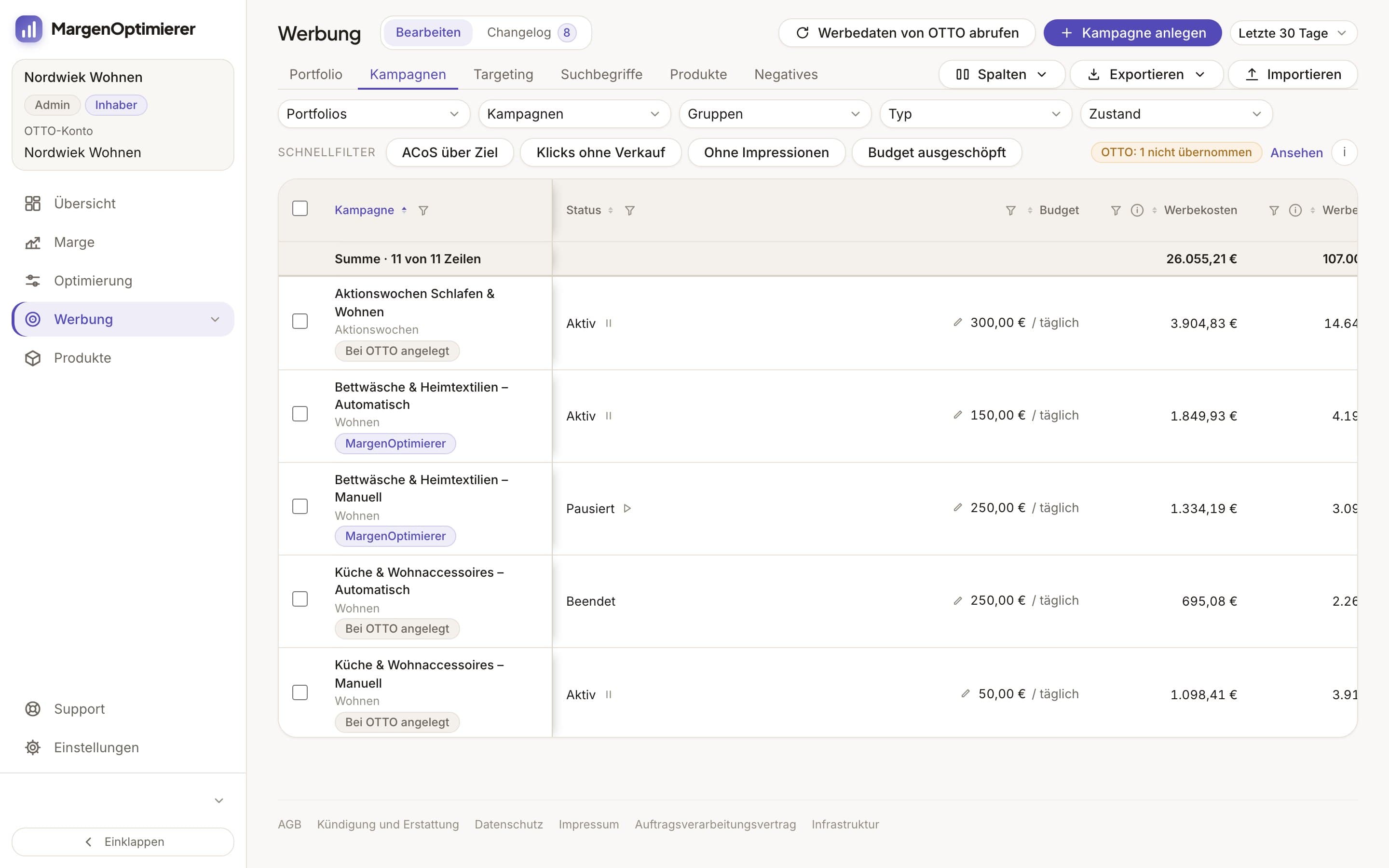
On the Werbung (Advertising) page, the ad console, every campaign sits with its numbers. Below it sits every targeting, meaning every item and keyword you set a bid on. Next to the bid you see what the targeting cost and what revenue it brought. Next to that is its ACoS, the share of ad spend in ad revenue, and your target for it, the target ACoS. Optimierung (Optimization) sorts your targetings into four rows, „Zu teuer“ (Too expensive), „Klicks ohne Verkauf“ (Clicks without a sale), „Läuft gut“ (Going well) and „Kaum gesehen“ (Hardly seen). One click queues new bids for the selected targetings of a row, and you see the new one next to every bid beforehand. A change only goes to OTTO when you send it. All queued and sent changes are in one list, the Changelog. There you see for each change whether OTTO has applied it.
In the Retouren (Returns) tab of Optimierung you see which items come back more often than your target return rate allows and in what condition the goods came back. You keep maintaining your items, stock and orders where you maintain them today. MargenOptimierer doesn't replace an inventory management system.
MargenOptimierer costs from 49 € net per month. You can test the first 14 days for free, no credit card needed.
Frequently asked questions
Is there a Sellerboard for OTTO?
No. Sellerboard names only Amazon and Walmart USA on its site, as of 28 October 2026. For profit per item on OTTO you need a tool that connects to OTTO, or you do the math yourself with OTTO's invoices and reports.
How do I find software that works with OTTO?
OTTO has no complete list and no public app store. The service provider page on otto.market shows almost only companies of the Otto Group. For integration, first look in your own inventory management system or shop system, in the list of marketplaces it can connect to. If OTTO isn't listed, ask the provider whether it connects to OTTO. For any other program, check whether it connects to your account through a login at OTTO. Then you only enter your OTTO password at OTTO.
What is the OTTO counterpart to Helium 10?
For keywords, OTTO has its own tool in the partner portal. Under „Analysen“ → „Potenzialanalysen“ (Potential analyses) → „Suchbegriff Analyse“ (Search term analysis) you see what shoppers search for on otto.de and at what average position a product ranks for a search term without ads. There are also individual providers of rank trackers and repricers for OTTO, programs that track your placement in search or adjust your prices automatically.
Keanu Dutado
Keanu Dutado sells on OTTO and other marketplaces with his own company and runs the ads himself. He has several years of e-commerce experience and was an Amazon Ads Manager at Snocksulting / Remazing Nova. He founded MargenOptimierer.
Last updated and sources
Last updated: 7 November 2026
- iBusiness: Retail Media, Otto öffnet Ads-Schnittstellen für Pacvue (22 September 2026), as of 28 October 2026
- OTTO Market API: Changelog, as of 28 October 2026
- OTTO Market: Dienstleister, as of 28 October 2026
- OTTO Market API: Integration für Servicepartner, as of 28 October 2026
- OTTO Market: Servicepartner-Programm, as of 28 October 2026
- OTTO Advertising: Sponsored Product Ads, as of 28 October 2026
- Sellerboard: marketplace information, as of 28 October 2026
- Helium 10, as of 28 October 2026
- Teikametrics, as of 28 October 2026
- Quartile, as of 28 October 2026
- Skai: Retail Media, as of 28 October 2026
- DataHawk: FAQ, as of 28 October 2026
- Sponsored Product Ads, Reporting (Partner Helpdesk, login required), as of 13 July 2026
Next
- How do I become a seller on OTTO?
- How do I calculate my profit per item on OTTO?
- How do Sponsored Product Ads work on OTTO?
- What is the OTTO Market API for sellers?