How do I log in to OTTO Partner Connect?

By Keanu Dutado · Last updated: 7 November 2026
In short
OTTO Partner Connect is the partner portal where you manage everything as a seller on OTTO, the counterpart to Seller Central on Amazon. You log in at portal.otto.market with your username and password, then with a six-digit code from an authenticator app. Only registered OTTO partners get access. In the menu, orders and returns are under „Aufträge“ (Orders), payouts and invoices under „Finanzen“ (Finance), reports under „Analysen“ (Analytics) and ads under „Marketing“.
If you're new to selling on OTTO or come from Amazon, you look for the login first and then for every function in the wrong place. The portal is organized by task, not by report, and some things appear twice, returns for example under „Aufträge“ and under „Analysen“. If you know where everything is, you save clicks every day and don't miss a deadline.
The OTTO login is portal.otto.market with a two-factor code
The OTTO Partner Connect login is at portal.otto.market. On otto.market the button „Zum Partner-Portal“ (To the partner portal) takes you there. OTTO recommends a computer with Safari, Chrome, Edge or Firefox.
Login always has two steps. First you enter your username and password, then a six-digit code from an authenticator app on your phone. OTTO names Google Authenticator and FreeOTP for this. You set up the second factor at your first login by scanning a barcode with the app. The code is always generated by the phone of the person logging in.
How to get access to OTTO Partner Connect
Only registered partners get access to OTTO Partner Connect. You apply on otto.market, OTTO reviews every application and after approval sends you a link to the registration form. After registration you get an email with your username and the link to the portal. At your first login you set your own password and set up the second factor. What you need for the application is covered in How do I become a seller on OTTO?
More users and their rights on OTTO
At the start your company has one user. You add more users through the gear icon at the top right in user management, according to OTTO up to nine more. Per area, a user gets full access or none. Anyone using their own interface also needs the „API-Zugriff“ (API access) right, and anyone connecting a provider's app to your account needs the right for service partners.
The layout has six areas and the settings
These are the areas of the portal and what's in them. There's also the start page with news from OTTO.
| Area | What you'll find there |
|---|---|
| „Produkte“ (Products) | Creating items, stock and marketplace status |
| „Aufträge“ (Orders) | Orders, shipped items and returns |
| „Finanzen“ (Finance) | Payouts, payment history and OTTO's invoices |
| „Analysen“ (Analytics) | Controlling, logistics, customer behavior, benchmark and reports |
| „Marketing“ | Booking ads and other OTTO services, Sponsored Product Ads campaigns and reports |
| „Kundenanfragen“ (Customer inquiries) | Messages from your customers |
The gear icon takes you to the settings for shipping, returns, payment and users. The apps you've given access to your account are also there, under „Servicepartner“ (Service partners).
Where to find what you need every day
- You process new orders under „Aufträge“, yourself in the portal or through an integration. According to OTTO you have to report a received return within 48 hours. Where you see returns in detail is covered in Where do I see my returns on OTTO?
- What OTTO pays you is under „Finanzen“. OTTO pays out weekly on Thursdays. You download the documents for every payout there, including the marketplace fee invoices.
- Revenue, fees and return rate are under „Analysen“, for example under „Controlling“ and „Logistik“ (Logistics).
- You book ads under „Marketing“ → „Marketing Services buchen“ (Book marketing services). Campaigns and reports are then under „Marketing“ → „Sponsored Product Ads“. How advertising on OTTO works is covered in How does advertising on OTTO work with Sponsored Product Ads?
Getting help from OTTO through the Partner Helpdesk
In the portal, the Partner Helpdesk leads to articles and videos from OTTO. You ask OTTO a question there through the form for a new case, one topic per case. There's also an AI assistant from OTTO at the top right of the portal.
When login doesn't work
- No email with your login details? OTTO asks you to check your spam folder.
- New phone or a code that doesn't work? Another user at your company with access to user management resets your second factor there. If you're the only user, according to OTTO you can't do it yourself. Then your only route is through the Partner Helpdesk.
- No access to an area? User management grants the right per area.
So set up a second user early. Then a lost phone won't lock you out of your own account.
What the portal doesn't show
Revenue, fees and ad spend sit in different places in OTTO Partner Connect. The portal doesn't show a profit per item anywhere. For that, you download invoices under „Finanzen“, ad reports and reports under „Analysen“ one by one and combine them yourself. How that works is covered in How do I calculate my profit per item on OTTO?
Worked example of how long you wait for a payout
Say you report the shipment of an acacia chair on a Monday. OTTO bills what has been reported as shipped, sets a due date of 14 days and pays out weekly on Thursdays. So the money is due on the Monday two weeks later and paid out on the Thursday after that.
| Day | What happens |
|---|---|
| Monday | You report the shipment of the chair |
| Monday, 14 days later | The money is due |
| Thursday, 17 days after the sale | OTTO pays out |
Depending on the weekday you report on, that puts 14 to 20 days between the sale and the money in your account.
Profit and ads without piecing it together in the portal
MargenOptimierer reads orders, returns, campaigns and ad numbers through OTTO's official interface, automatically every night. You start the connection once in MargenOptimierer, log in at OTTO and confirm it there. You only enter your password at OTTO. The connection then appears under „Servicepartner“ in your settings, where you can end it at any time.
The Marge (Margin) page shows you for every item what's left after VAT, OTTO commission, ad spend, returns and your own costs, without a single download from „Finanzen“ or „Analysen“. In the Werbekonsole (ad console), every campaign and targeting sits with ad spend, ad revenue and ACoS next to your target ACoS, every targeting with its bid. Optimierung (Optimization) shows you which bids are above your target and which are doing well.
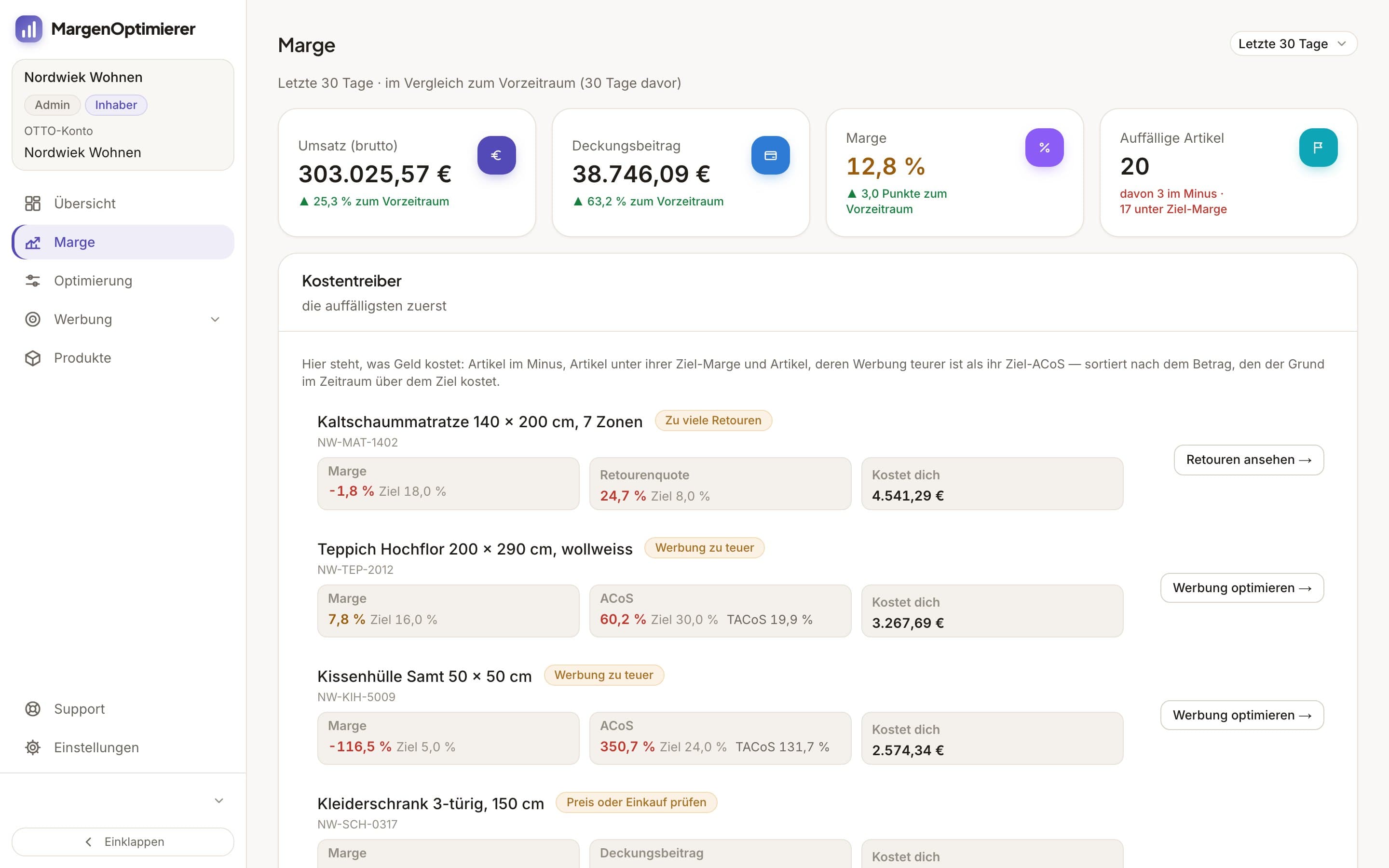
MargenOptimierer costs from 49 € net per month. You can test the first 14 days for free, no credit card needed.
Frequently asked questions
Where is the OTTO seller login?
What Amazon calls Seller Central is OTTO Partner Connect on OTTO. The seller login is at portal.otto.market. The site otto.market is OTTO's site for sellers, with the application, terms and the button „Zum Partner-Portal“.
Which authenticator app do I need for OTTO?
OTTO names Google Authenticator and FreeOTP. The app generates the six-digit code you enter after your password at every login.
Is there a phone number for OTTO sellers?
OTTO doesn't name a phone number for sellers in its documents. You ask questions in the Partner Helpdesk through the form for a new case, one topic per case. If you work with an integration provider, OTTO says to ask them first about problems with the interface.
Is OTTO Partner Connect the same as Seller Central?
It's the counterpart. As on Amazon, you manage items, orders, payouts and ads there. Advertising on OTTO is called Sponsored Product Ads, and the interface for software is the OTTO Market API, with more in What is the OTTO Market API for sellers?.
Keanu Dutado
Keanu Dutado sells on OTTO and other marketplaces with his own company and runs the ads himself. He has several years of e-commerce experience and was an Amazon Ads Manager at Snocksulting / Remazing Nova. He founded MargenOptimierer.
Last updated and sources
Last updated: 7 November 2026
- OTTO Market: OTTO Partner Connect, as of 7 November 2026
- OTTO Market: Onboarding Guide (English), as of January 2026, read on 7 November 2026
- OTTO Market: FAQ (English), as of 7 November 2026
- OTTO Market: Abrechnung, as of 7 November 2026
- OTTO Advertising: Sponsored Product Ads, as of 7 November 2026
- OTTO Market API: Anbindung für Händler, as of 7 November 2026
Next
- How do I become a seller on OTTO?
- What software is available for OTTO sellers?
- What is the OTTO Market API for sellers?