What is the OTTO Market API for sellers?

By Keanu Dutado · Last updated: 7 November 2026
In short
The OTTO Market API is the official interface through which programs talk to your OTTO account, such as inventory management systems, shipping programs and tools for profit and advertising. You don't have to program anything yourself. You give an app access in OTTO Partner Connect, with your OTTO login and without handing over your password. Before approving, check the areas an app asks for, because OTTO only lets you approve all of them or none. You can revoke access yourself at any time under the „Servicepartner“ (service partners) settings.
Every program that processes your OTTO data needs access to your account. If you don't know how this access works, you either give away too much or don't dare touch any software and maintain everything yourself in the partner portal. Giving away too much costs security, and maintaining everything yourself costs time every day.
What goes through the interface
The OTTO Market API is divided into areas, which OTTO calls scopes. An app only gets the areas you approve.
| Area | What an app can do with it |
|---|---|
| Products | Create and change items |
| Availability | Report stock |
| Orders | Read and process orders |
| Shipments, Shipping Profiles | Report shipments, maintain shipping profiles |
| Returns | Read, accept or reject returns |
| Returns Warehouse | Read or maintain return addresses and return carriers |
| Price Reduction | Give partial refunds on shipped items so no return comes |
| Receipts | Read your customers' receipts |
| Sponsored Product Ads | Create and change campaigns, fetch ad reports |
Your OTTO invoices, your payouts and the numbers for Sponsored Display Ads don't come through the interface. They're only in the partner portal.
Two routes to your account, your own access or a provider's app
Your own access is for sellers who program themselves. Anyone with the „API-Zugriff“ (API access) right in user management creates their own app in the partner portal and chooses its areas. OTTO shows this app's password only once.
A provider's app is the usual route. OTTO calls such providers Servicepartner. Their app is either private, in which case you get an invitation link that's valid for 24 hours and works only once. Or it's public, in which case its link works for everyone. An app only becomes public once OTTO has reviewed it per area.
How approving an app works
For this, your user needs the right for service partners in user management.
- You open the provider's link.
- You log in at OTTO, on OTTO's page, with your own login.
- OTTO shows you the areas the app asks for. You agree to all of them or cancel, and approving only some isn't possible.
- The app then appears in your settings under „Servicepartner“ among the installed apps.
If a provider later wants more areas, it needs a new version of its app. OTTO then sends you an email and shows a notice in the portal. Whether you install the new version is your decision.
What to check before approving
- Password only at OTTO. An app that asks for your OTTO password isn't using this route. Through the interface, you enter your password only on OTTO's page.
- Areas that fit the task. An advertising tool needs the Sponsored Product Ads area, a shipping program Orders and Shipments. If an app asks for more than its task needs, ask why.
- All or nothing. Because you can only approve all of an app's areas, you're deciding on the whole app.
- Reading and changing. Most areas allow both at once, and you can't approve them separately. Ask the provider when its app changes something and whether you see it beforehand.
How to revoke an app's access
In OTTO Partner Connect, open the settings via the gear icon and go to „Servicepartner“. Among the installed apps, hover over the app's name, click „Zugriff entziehen“ (Revoke access) and confirm. After that, the app can no longer reach your data. You can install it again later.
If you've created your own access, also check regularly which users have the „API-Zugriff“ right. According to OTTO, credentials expire after 180 days if no fixed addresses are stored for them from which programs may send requests.
Worked example: How many requests an app may send to OTTO per day
Say you have 1,000 items, and your program syncs stock with OTTO every hour. For stock, OTTO takes up to 200 items per request and 10 requests per second.
| Requests per sync: 1,000 ÷ 200 | 5 |
| Requests per day: 5 × 24 | 120 |
| Duration of one sync: 5 ÷ 10 per second | half a second |
If a program queries each item individually, that's 1,000 requests and 100 seconds per sync. So if you have many items, ask a provider how up to date your stock is at OTTO.
Through the interface, with your consent at OTTO
MargenOptimierer connects to your account through the OTTO Market API. It asks for the areas for items, stock, orders, shipments, shipping profiles, returns, partial refunds, receipts and Sponsored Product Ads, because profit per item needs all these numbers. The only thing MargenOptimierer can change at OTTO is your advertising, meaning campaigns, budgets and bids. You start the connection in MargenOptimierer, log in at OTTO and agree there. MargenOptimierer never sees your OTTO password. After that, MargenOptimierer appears in your settings under „Servicepartner“, and you can end the connection there at any time.
Every night, MargenOptimierer fetches your orders, returns, campaigns and ad numbers. From these, the Marge (Margin) page calculates your profit per item, and the ad console shows each bid next to its performance and your target ACoS. Only what you send to OTTO yourself gets changed at OTTO. You see every change beforehand, and the Changelog then shows whether OTTO accepted it.
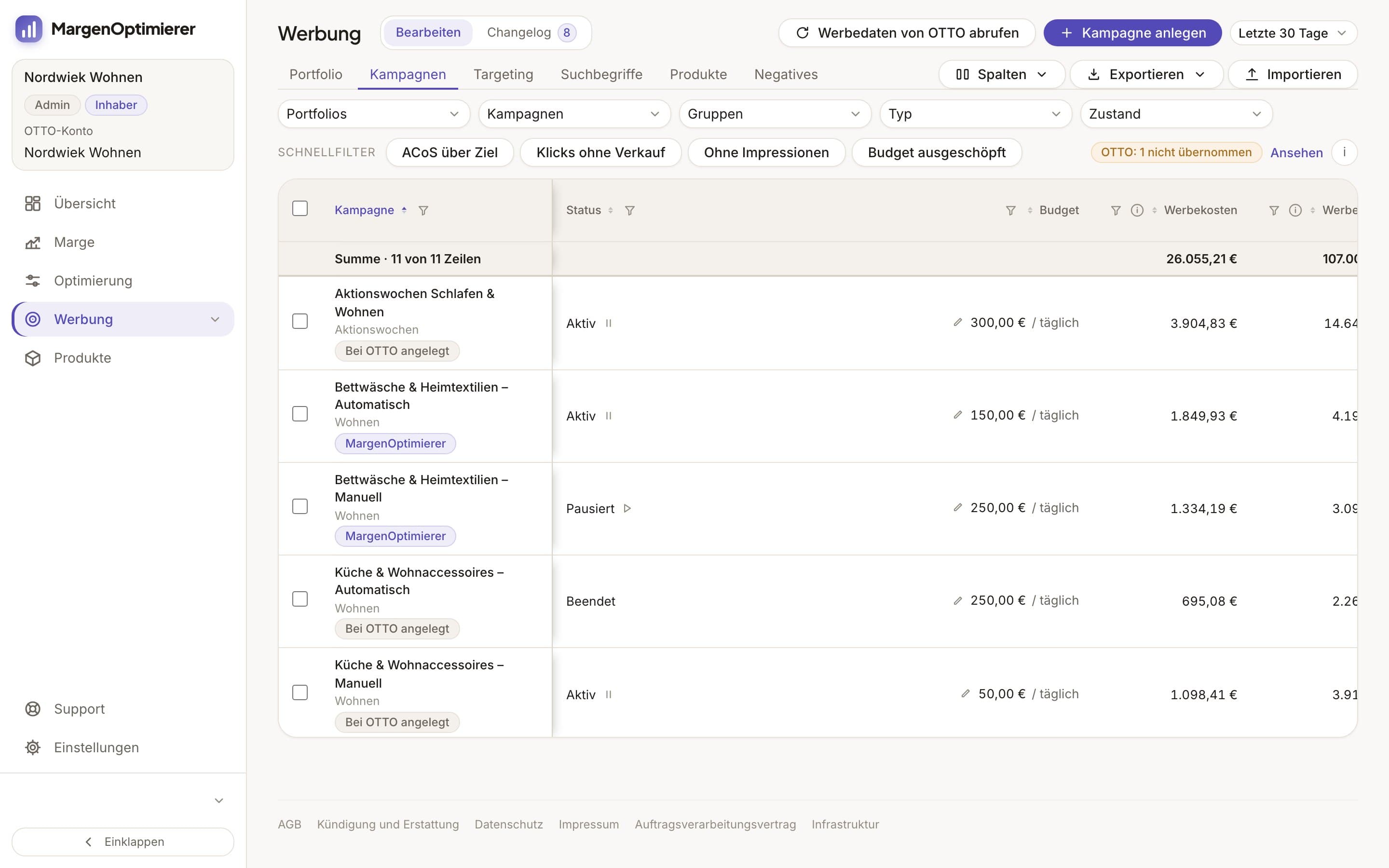
MargenOptimierer costs from 49 € net per month. You can test the first 14 days for free, no credit card needed.
Frequently asked questions
Do I need the OTTO Market API as a seller?
Not directly. You need it as soon as a program is supposed to maintain your items, orders or advertising at OTTO. You then give that program access through the interface, with no programming on your part.
Can an app read my payouts and fees?
No. The interface doesn't release OTTO's invoices, payouts and fees. They're only under „Finanzen“ (Finance) in the partner portal. A program therefore works out the fees from commission rates and orders.
What happens to my data if I revoke access?
The app can no longer reach your account after that. What it fetched before stays with the provider. Ask them when they delete it.
Keanu Dutado
Keanu Dutado sells on OTTO and other marketplaces with his own company and runs the ads himself. He has several years of e-commerce experience and was an Amazon Ads Manager at Snocksulting / Remazing Nova. He founded MargenOptimierer.
Last updated and sources
Last updated: 7 November 2026
- OTTO Market API: Anbindung für Händler, as of 7 November 2026
- OTTO Market API: Anbindung für Servicepartner, as of 7 November 2026
- OTTO Market API: Über die Schnittstelle, as of 7 November 2026
- OTTO Market API: Changelog, as of 7 November 2026
Next
- What software is available for OTTO sellers?
- How do I log in to OTTO Partner Connect?
- How do I become a seller on OTTO?